Check that the hosts apply the firewall
Read the realization state of the firewall on each host, the wanted and applied version, preconditions and errors, and what to do when a host lags.
The control plane works out the firewall plan of each host and sends it; the host agent applies it and reports back. Realization is the state of that exchange per host: whether the host runs the version that the control plane wants. Check it after a change that must be in force, and when a rule does not seem to work. Reading it needs the privilege to read the firewall on the root of the inventory.
In the console
On the home page, select Firewall and open the tab Realization. The tab is shown for the provider scope only. The same table is in the card Realization per host of the tab Rollout.
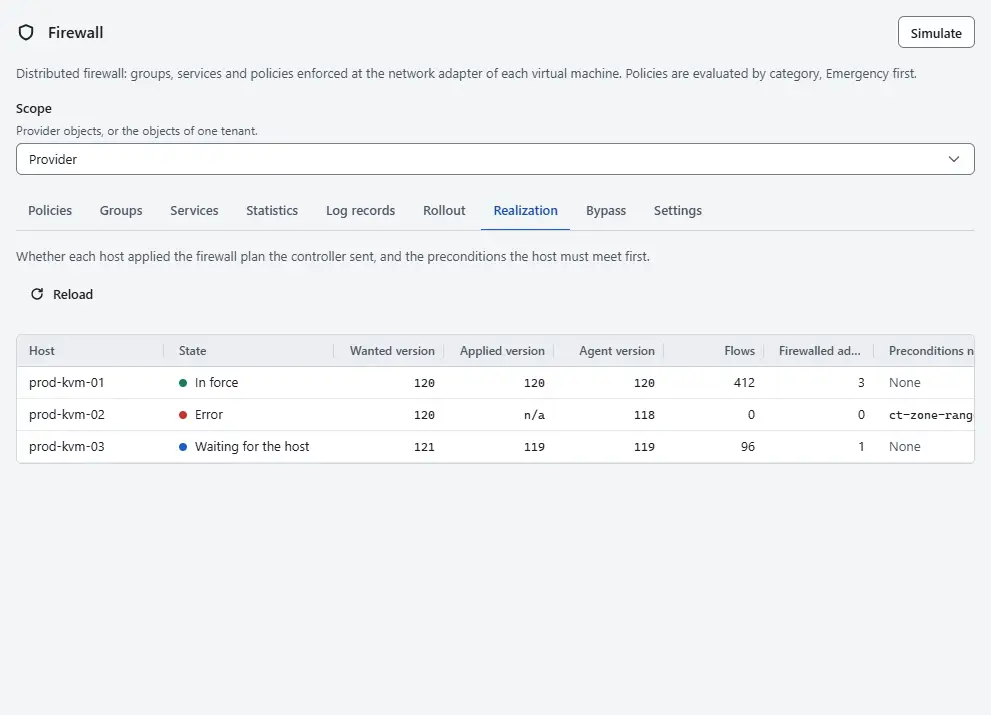
- Find the host in the column Host. Read the State:
- In force: the host applied the version that the control plane wants.
- Waiting for the host: the host runs an older version. This is normal for a moment after a change.
- Precondition not met: the host does not meet a condition that the firewall needs, listed in the column Preconditions not met.
- Error: the host could not apply the plan, and the text is in the column Error.
- Compare the Wanted version and Applied version version. The Agent version is the plan version that the host agent holds. Flows is the number of firewall flows on the host, Firewalled adapters the number of network adapters that it firewalls, and Last report the time of its last report.
- Select Reload to read the table again. A host that lags catches up within seconds when it is connected. When it does not, check the host and its host agent in the inventory.
- For a state Precondition not met, read the explanation next to the precondition. The precondition
ct-zone-rangeasks the owner of the host to set the connection-tracking zone range of Open vSwitch so that it ends below the firewall zones, and to restart the host agent. Kyvernon does not set it. Until it holds, the host firewalls no network adapter: they keep forwarding as in the mode Off, and the state shows the error. - For a state Error, read the text. When the plan has more firewall flows than a bridge may hold, the host keeps the previous version in force and reports it; reduce the groups or rules that grew, or raise Flow limit per bridge on the tab Settings if the host can carry it. The events Events record when the error appears and when the firewall is in force again.

Result
Each host is In force, or the table says what is missing. A change that you publish waits for the hosts that are concerned and names those that did not apply it in time, so this table is where you look next. A network adapter shows the same information as Realization on its card of the tab Firewall.
Automation
With the CLI
kyvernon firewall realization
kyvernon firewall realization --host host-3
With the API
GET /v1/firewall/realization returns for each host the wanted and applied version, the agent version, the number of flows, the preconditions and the error. A write to a firewall object waits for realization when you add ?wait=realized&timeoutSeconds=30 to it; pendingHosts in the answer lists the hosts that were not ready. The CLI does the same with --wait.
Related
Version 0.1. Last changed: 2026-11-14