IP pools
Create, change and delete IP pools of public addresses in the console and see free addresses, allocations, quarantine and reverse DNS requests.
An IP pool holds public addresses on one host-bridge network, an Open vSwitch bridge with port security. Create the network first, as described in Host-bridge networks; its own DHCP range stays for internal addresses and must not overlap the pool. You create, change, delete and monitor pools in the console. Networking concepts explains how an address reaches a virtual machine.
In the console
Open the home page and select IP pools.
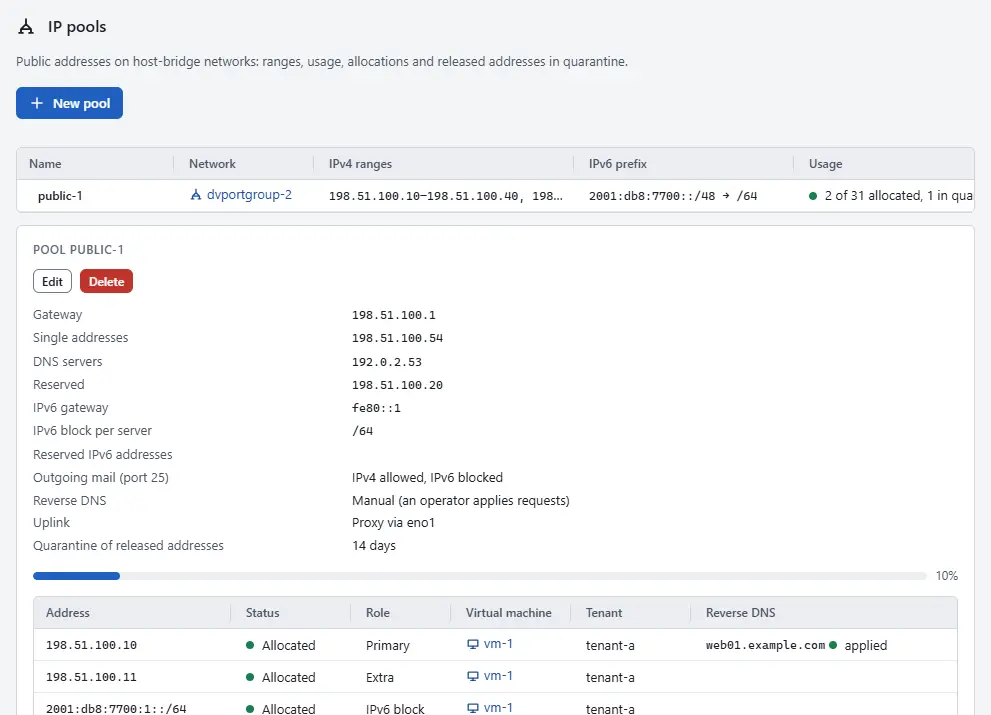
- Read the table of pools. Per pool it shows the Name, the Network, the IPv4 ranges, the IPv6 prefix, the Usage (allocated and quarantined addresses) and the Free (free IPv4 addresses and IPv6 blocks).
- Select a pool name to see its settings: gateway, single addresses, DNS servers, reserved addresses, the IPv6 gateway and the size of the IPv6 block per server, the setting for Outgoing mail (port 25), the Reverse DNS mode, the Uplink and the Quarantine of released addresses period.
- Read the table Allocations below the settings. Each row is an address with its Status (Allocated or Quarantine), its Role, the Virtual machine, the Tenant, the Reverse DNS and the date it was allocated or the date its quarantine ends.
- To take an address back, select Release on its row. The address goes into quarantine and the guest loses it; the row has no confirmation step, so check the address first.
- For a reverse DNS name that is waiting for the provider, select Mark applied when the name is in place, or Reject and enter a reason. See Reverse DNS.

Create or change a pool
On the page IP pools, select New pool. To change a pool, select it and then Edit.
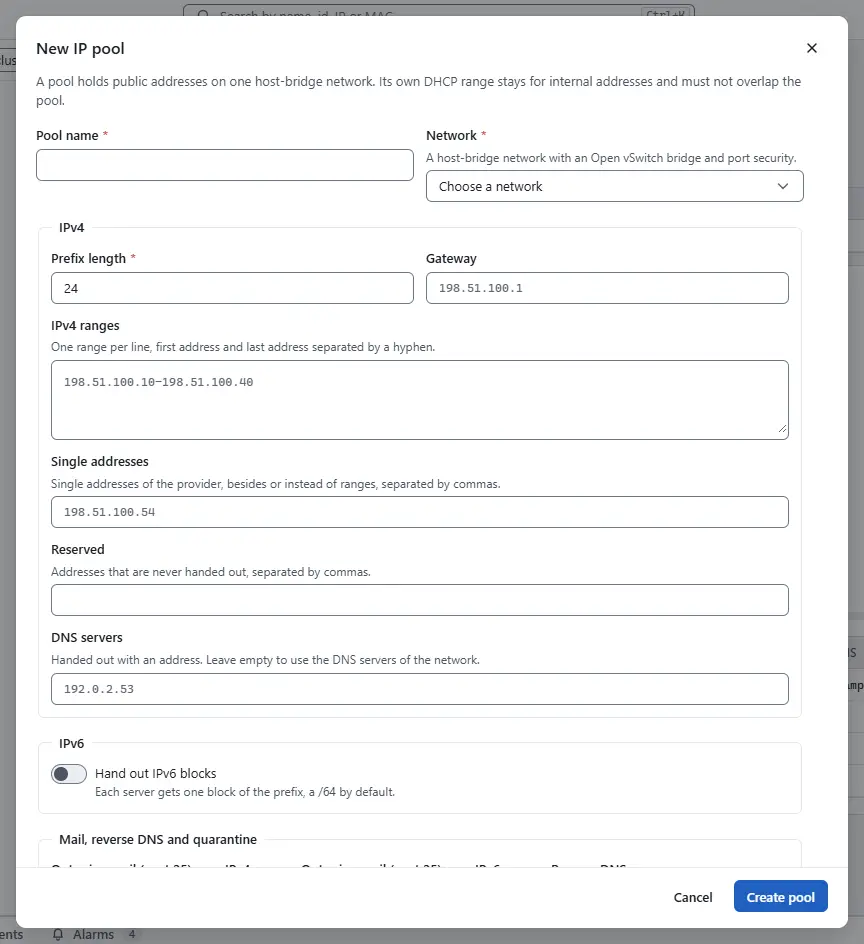
- Enter the Pool name and choose the Network. The network of a pool cannot change afterwards.
- Under IPv4, enter the Prefix length, the Gateway and the IPv4 ranges, one range per line with the first and the last address separated by a hyphen. Add single addresses of the provider under Single addresses, addresses that are never handed out under Reserved, and the DNS servers that guests get. Without DNS servers the pool hands out those of the network.
- To hand out IPv6 blocks, switch on Hand out IPv6 blocks and enter the Prefix, its Prefix length, the IPv6 block per server and the IPv6 gateway. Use block length 112 when the provider gives the host a single /64. While blocks are allocated or in quarantine the prefix and the block length are locked, and the dialog says so.
- Under Mail, reverse DNS and quarantine, choose for each family whether servers may send mail on port 25 (Outgoing mail (port 25) over IPv4 and Outgoing mail (port 25) over IPv6), the Reverse DNS mode and the Quarantine of released addresses in days.
- Select Create pool, or Save pool for a change. A change keeps the allocations: an address that is allocated stays with its server, even when you take it out of the ranges. A range that overlaps another pool on the same network is refused with
error.ip_pool.overlap. - To delete a pool, select Delete, type the name of the pool and confirm. A pool that still has allocated addresses cannot be deleted; release them first.

You need the privilege Network.Config on the network of the pool; without it the buttons are off and say so.
Assigning addresses to a server is done on the server, as described in Public addresses.
How addresses are handed out
- Free addresses. The free count of a pool is what the allocator can hand out now. Gateway, reserved, network and broadcast addresses, allocated addresses and addresses in quarantine are never counted, and an allocation without an address takes the lowest free one. Listing free addresses reserves nothing: when someone else takes the address first, the assign dialog says so and lists the free addresses again.
- Quarantine. A released address is not handed out again for 14 days by default. The pool setting Quarantine of released addresses shows the period.
- IPv6. Each server gets one block of the pool's prefix, a /64 by default. Its address is
<block>::1, configured with the on-link prefix (at least /64) and the IPv6 gateway of the pool. Router advertisements come from the router on the host side; a guest that sends one is dropped. When the provider gives the host a single on-link /64, the pool hands out /112 blocks instead: block 0, the gateway's block and blocks with a reserved address are never handed out, the guest configures<block>::1/64with the gateway, and the switch lets it send only from its /112. The prefix and block length cannot change while blocks are allocated or in quarantine. - Single addresses. A provider that routes no block but gives single on-link addresses gets one pool per subnet, with single addresses instead of or besides a range.
- Outgoing mail (port 25). The pool sets whether IPv4 and IPv6 servers may send mail on port 25 (IPv4 allowed and IPv6 blocked by default); change it in the dialog of the pool. An operator can unblock a server whose mail is legitimate on the tab Networks of the server, as described in Public addresses. Every change is in the events.
- Uplink. The network of the pool has its uplink in the bridge (bridged, the default: the provider must accept the MAC addresses of the guests) or not (proxy: the host routes each public address to the bridge and answers the router of the provider). In proxy mode the operator enables forwarding and proxy ARP and NDP on the uplink once and loads the firewall rules; the agent keeps routes, proxy entries and firewall sets per address.
Automation
With the CLI
Create a pool, then list pools, allocations and free addresses:
kyvernon ip-pools create --name public-1 --network network-7 --prefix-len 24 \
  --range 198.51.100.10-198.51.100.200 --gateway 198.51.100.1 --dns 198.51.100.2 \
  --reserved 198.51.100.53 --ipv6-prefix 2001:db8:7700::/48 --ipv6-gateway fe80::1
kyvernon ip-pools list
kyvernon ip-pools allocations ippool-1
kyvernon ip-pools available ippool-1 --limit 20
Further options of create:
| Option | Meaning |
|---|---|
--address <ip> | A single on-link address, repeated per address, instead of or besides --range. |
--quarantine-s <seconds> | Quarantine period of released addresses (14 days by default). |
--ipv6-block-len 112 | Block length per server, with --ipv6-reserved for the host's own address. |
--smtp-ipv4 allowed|blocked, --smtp-ipv6 blocked|allowed | Outgoing mail on port 25. |
--rdns manual | Reverse DNS names are requests that an operator applies. |
kyvernon ip-pools available lists the free IPv4 addresses, lowest first, with the number of free IPv4 addresses and IPv6 blocks (limit defaults to 256, at most 4096). When another caller takes a listed address first, an allocation of that address fails with error.ip_pool.address_in_use, or with error.ip_pool.address_quarantined for an address in quarantine; list again or leave the address out. The uplink mode is set on the network, as described in Host-bridge networks.
With the API
| Task | Request | Privilege |
|---|---|---|
| Create, change, delete a pool | POST /v1/ip-pools, PUT and DELETE /v1/ip-pools/{id} | Network.Config on the network |
| List, read | GET /v1/ip-pools, GET /v1/ip-pools/{id} | Network.Config on the network |
| Free addresses | GET /v1/ip-pools/{id}/available?limit=N | Network.Config or Network.Assign |
| Allocations | GET /v1/ip-pools/{id}/allocations | Network.Config on the network |
| Allocate an address | POST /v1/ip-pools/{id}/allocations | Network.Assign, and VirtualMachine.Config.Settings on the server |
| Release an address | DELETE /v1/ip-pools/{id}/allocations/{address} | Network.Assign on the network |
| Outgoing mail of a server | GET and PUT /v1/vms/{id}/smtp | System.View to read, Network.Config to change |
A change of a pool carries expectedVersion, and allocations are kept. A pool that still has allocations cannot be deleted. The gRPC service IpPoolService offers the same operations.
Related
- Public addresses assigns and releases the addresses of a server.
- Reverse DNS sets and confirms names.
- Host-bridge networks creates the network of a pool.
Version 0.1. Last changed: 2026-11-14