Reverse DNS
Set the reverse DNS name of a public address in the console, automatically through PowerDNS or by request to the provider.
The reverse DNS name of a public address is the name that a lookup of the address returns. You set it per address on the server, and you need the privilege VirtualMachine.Config.Settings on the server. The server must already have a public address, as described in Public addresses.
In the console
Select the server in the inventory and open the tab Networks. The card Public addresses lists each address with a field in the column Reverse DNS.
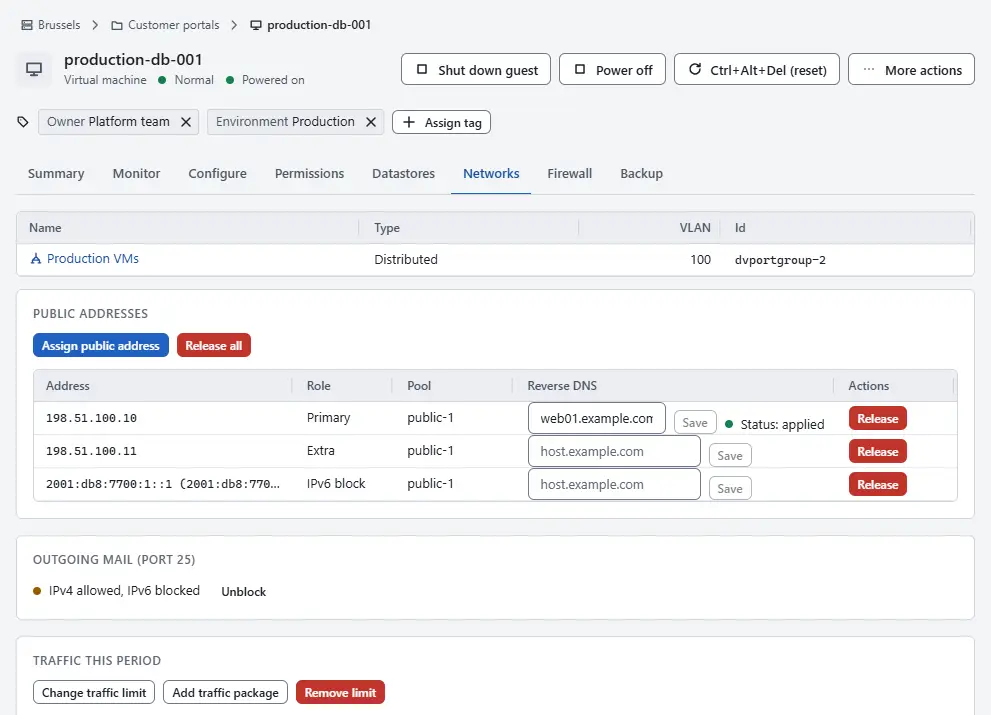
- Enter the name, for example
web.example.com, in the field of the address. - Select Save. To remove the name, empty the field and select Save.

The field shows the status of the name next to it: applied, requested, rejected with the reason, or to remove. A refused name is explained by the error codes of the area rdns.
Confirm a request as an operator
When the reverse zone of an address belongs to the provider, the pool is set to manual reverse DNS. A name is then stored as requested, and a webhook tells the portal or an operator to apply it at the provider. An operator with the privilege Network.Config on the network confirms it:
Open the home page, select IP pools and select the pool.
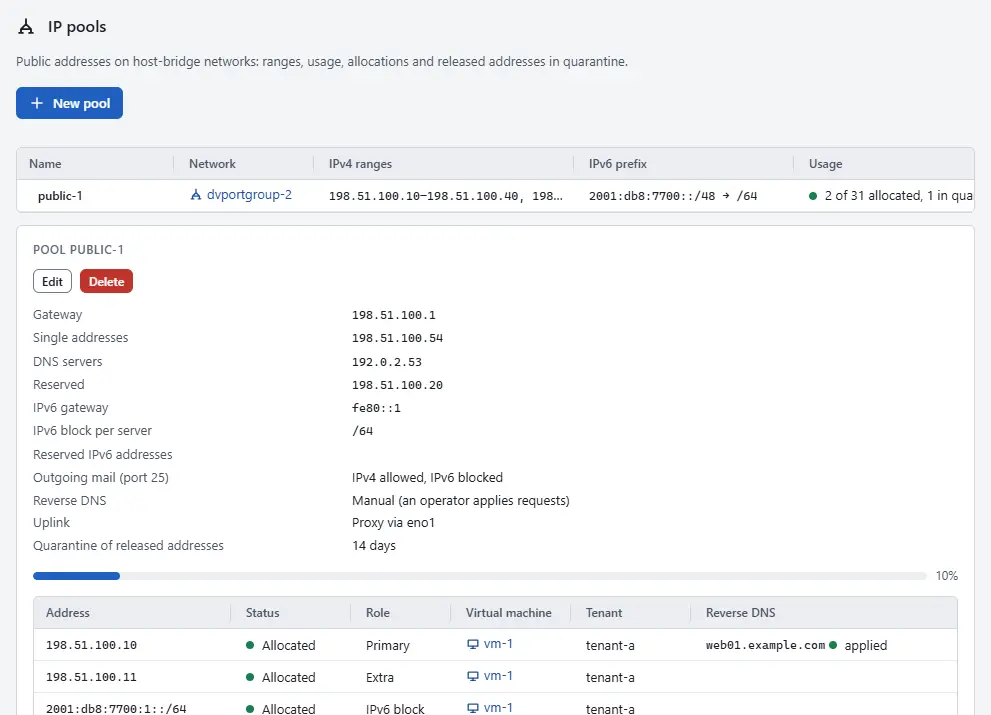
- On the row of the address, select Mark applied when the name is in place, or Reject and enter a reason. The server owner sees the reason on the Networks tab.

When an address is freed or its name is removed, the old name stays in the allocations of the pool as to remove until the operator marks it applied.
Result
With the DNS provider set to PowerDNS, Kyvernon writes the PTR record into the matching reverse zone and the status is applied. With the provider set to store names only, the name is kept in Kyvernon without a record. The operator of the controller chooses the provider and whether a name must first resolve to the address (forward confirmation); see Configuration. The pool setting Reverse DNS shows the mode of a pool.
Automation
With the CLI
kyvernon addresses ptr vm-42 198.51.100.10 --name web.example.com
kyvernon addresses ptr vm-42 198.51.100.10                 # removes the name
kyvernon ip-pools ptr-applied ippool-2 203.0.113.121
kyvernon ip-pools ptr-rejected ippool-2 203.0.113.121 --reason "name has no A record"
A pool is switched to manual reverse DNS when it is created with --rdns manual. The webhook event kyvernon.event.rdns.requested carries the tenant, the server, the address, the name and the action set or remove.
With the API
| Task | Request | Privilege |
|---|---|---|
| Set or remove the name of an address of a server | PUT /v1/vms/{id}/addresses/{address}/ptr | VirtualMachine.Config.Settings on the server |
| Set or remove the name as operator | PUT /v1/ip-pools/{id}/allocations/{address}/ptr | Network.Config on the network |
| Confirm or reject a request | POST /v1/ip-pools/{id}/allocations/{address}/ptr/applied, .../ptr/rejected | Network.Config on the network |
A rejection carries a reason in its body.
Related
- IP pools lists the allocations with their names.
- Public addresses assigns the addresses.
Version 0.1. Last changed: 2026-11-14