Emergency bypass
Open every network adapter of one host for a limited time with a reason, to recover from a firewall mistake, and end the bypass again.
An emergency bypass lets all traffic through to and from every virtual machine on one host, for a time that you choose, with an audited reason. Use it only to get back into virtual machines after a firewall mistake, then correct the rules. Only provider administrators with the bypass privilege can enable or end a bypass, and that privilege cannot be granted inside a tenant.
Warning
While a bypass is active, every network adapter on the host is open in both directions. Keep the time short and end the bypass as soon as you have fixed the rules.
In the console
On the home page, select Firewall and open the tab Bypass. The tab is shown only to users with the bypass privilege.
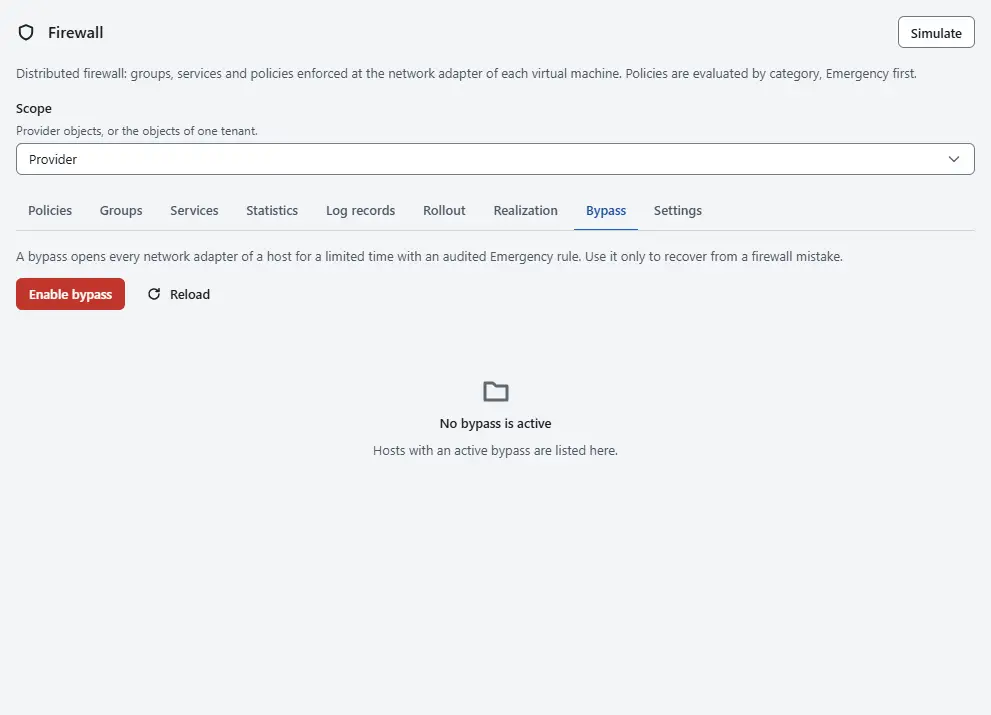
Select Enable bypass.
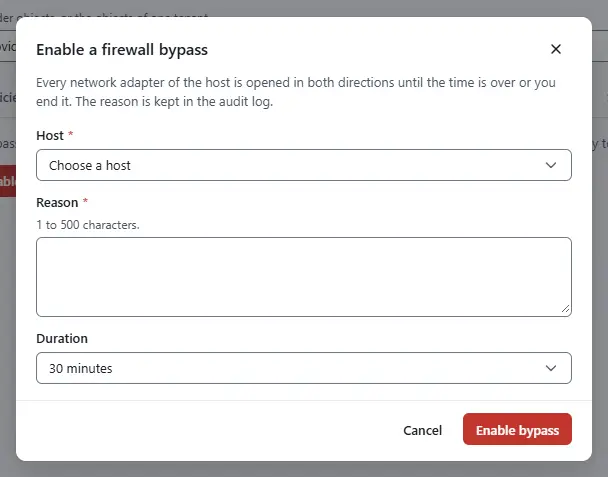
- Choose the Host.
- Enter the Reason, 1 to 500 characters. Say what failed and who asked, because the reason is kept in the audit log and shown to everyone who sees the banner.
- Choose the Duration: 5 minutes, 15 minutes, 30 minutes (the default), 1 hour, 4 hours, 12 hours or 24 hours.
- Select Enable bypass. The change runs as a task that you follow in Tasks.
- Read the list while the bypass is active. It shows the Host, the Reason, the time in Active until and the Rule number, the number of the rule that opens the host. Everyone who may read the firewall also sees the banner Firewall bypass active on the firewall page, on the tab Firewall of the virtual machines on that host and on the summary of the host.
- Correct the rules, as described in Rules and policies.
- To end the bypass before its time, select End bypass on its row and confirm with End bypass. The rules of the host apply again at once.


Result
The host lets all traffic through until the time is over or you end the bypass; then its rules apply again without any further action. Kyvernon records an event when a bypass starts and when it ends, with the way it ended: expired or removed. The reason stays in the audit log.
How the bypass works
- A bypass adds a policy in the category Emergency for the host, with one Allow rule in both directions, and a group with the virtual machines on that host. A virtual machine that moves to the host while the bypass is active is covered too. That category is evaluated first, so the rule overrides every other rule.
- Enabling a bypass on a host that already has one extends it to the new end time. There is one bypass for each host.
- A bypass needs a working host agent like any other firewall change: the host has to receive and apply the rule. Check that on the tab Realization; see Realization.
- The bypass does not change the mode of any adapter. When it ends, the rules apply as before.
Automation
With the CLI
kyvernon firewall bypass --host host-3 --reason "Rule 1042 locked out the operators" --for 30m
kyvernon firewall bypass list
kyvernon firewall bypass remove fwpolicy-12
With the API
POST /v1/firewall/bypasswith{"host": "host-3", "reason": "Rule 1042 locked out the operators", "durationSeconds": 1800}starts a task.durationSecondsruns from 60 to 86,400 and defaults to 1,800.GET /v1/firewall/bypasslists the bypasses in force.DELETE /v1/firewall/bypass/{id}ends one, with theidof the list.
Related
- Rollout to existing virtual machines avoids lockouts with a confirmation timer.
- Realization
- Firewall troubleshooting
- Firewall reference
Version 0.1. Last changed: 2026-11-14