Distributed switches and port groups
Create distributed switches with host uplinks and port groups with a VLAN or overlay, addresses, DHCP and fixed addresses, realised as OVN segments.
A distributed switch spans several hosts, and each of its port groups is a network that virtual machines connect to. With OVN logical networks switched on, every port group is a segment; Networking concepts explains how segments, uplinks and addresses work.
In the console
To create a switch:
Select Distributed switches in the navigation, then New distributed switch.
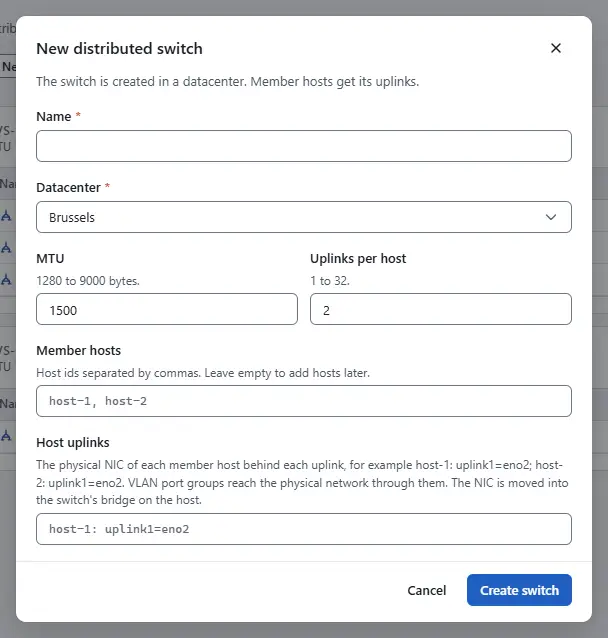
- Enter the Name, choose the Datacenter, and set the MTU and the number of Uplinks per host.
- In Member hosts, list the member hosts, separated by commas.
- In Host uplinks, give the physical NIC of each host behind each uplink, for example
host-1: uplink1=eno2; host-2: uplink1=eno2. VLAN port groups reach the physical network through these NICs. The host agent moves each NIC into the switch's bridge on its host, so use a NIC that carries no other traffic. - Select Create switch.

To add a port group:
On the line of the switch, select New port group.
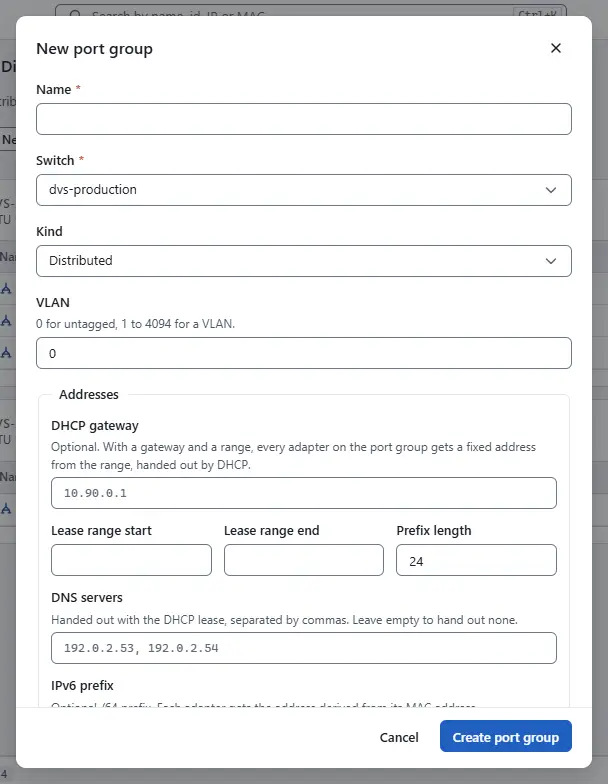
- Enter the Name. Under Kind, choose a VLAN and enter the VLAN, or choose an overlay segment and enter the Overlay segment (VNI).
- To give the virtual machines addresses, fill the fields under Addresses: DHCP gateway, Lease range start, Lease range end, Prefix length and the DNS servers. Every adapter on the port group then gets a fixed address from the range.
- Optionally enter an IPv6 prefix of length /64, and Fixed addresses as
MAC=addresspairs for adapters that need a given address. - Leave Answer DHCP selected to hand the addresses out by DHCP. Select Create port group.

To change a switch or a port group, select Edit on its line. To delete one, select Delete; a switch is deleted only when it has no port groups, a port group only when no virtual machine adapter uses it.

Result
The port group appears under its switch. Virtual machines with an adapter on it get their address when they start, and the distributed firewall matches their addresses in groups.
Automation
With the CLI
kyvernon network dvs-create --body-file dvs.json
kyvernon network portgroup-create --body-file portgroup.json
kyvernon network realization
dvs.json names the switch, the datacenter, the hosts and hostUplinks, for example [{"host": "host-1", "nics": {"uplink1": "eno2"}}]. portgroup.json names the switch, the vlanId or vni, and optionally ipv4 (prefixLen, gateway, rangeStart, rangeEnd, dnsServers, dhcp), ipv6 (prefix) and staticAddresses.
With the API
POST /v1/distributed-portgroups
Content-Type: application/json

{"name": "app-net", "switchId": "dvs-3", "vlanId": 100,
 "ipv4": {"prefixLen": 24, "gateway": "10.90.0.1", "rangeStart": "10.90.0.100", "rangeEnd": "10.90.0.150"},
 "staticAddresses": {"52:54:00:89:01:0b": "10.90.0.20"}}
PUT /v1/distributed-switches/{id} and PUT /v1/distributed-portgroups/{id} change only the fields they carry and need expectedVersion. The addresses of the adapters are in the port group's record, under leases.
Related
- Networking concepts explains segments, uplinks and addresses.
- Networking troubleshooting lists symptoms and remedies.
Version 0.1. Last changed: 2026-11-14