Groups and services
Collect adapters, VMs, networks, tags, MAC addresses and address ranges into firewall groups, and ports and source ports into named services.
Groups and services are the objects that firewall rules refer to. A group collects the members that a rule matches as source, destination or target, and a service names a set of protocols and ports. You need the privilege Kyvernon.Firewall.ManageGroups to create or change them; a tenant works in the scope of its own tenant.
In the console
On the home page, select Firewall, then the tab Groups. The table lists the Name, Description, Owner and Members of every group. A group of the provider that is shared with tenants carries the badge Shared, and a tenant sees only its name and description with Members hidden.
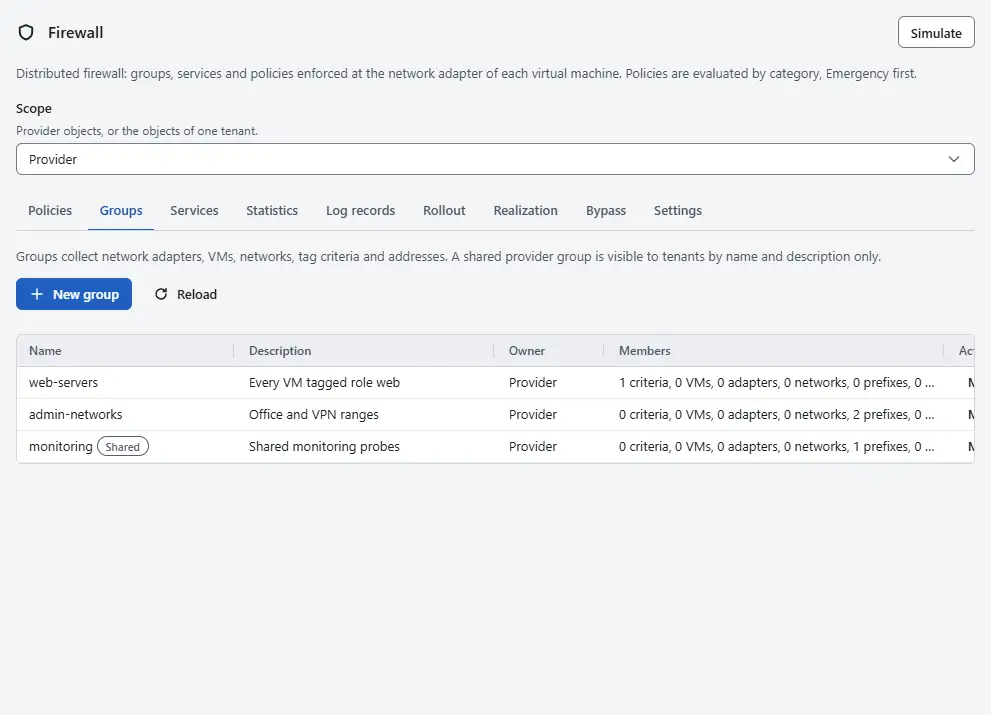
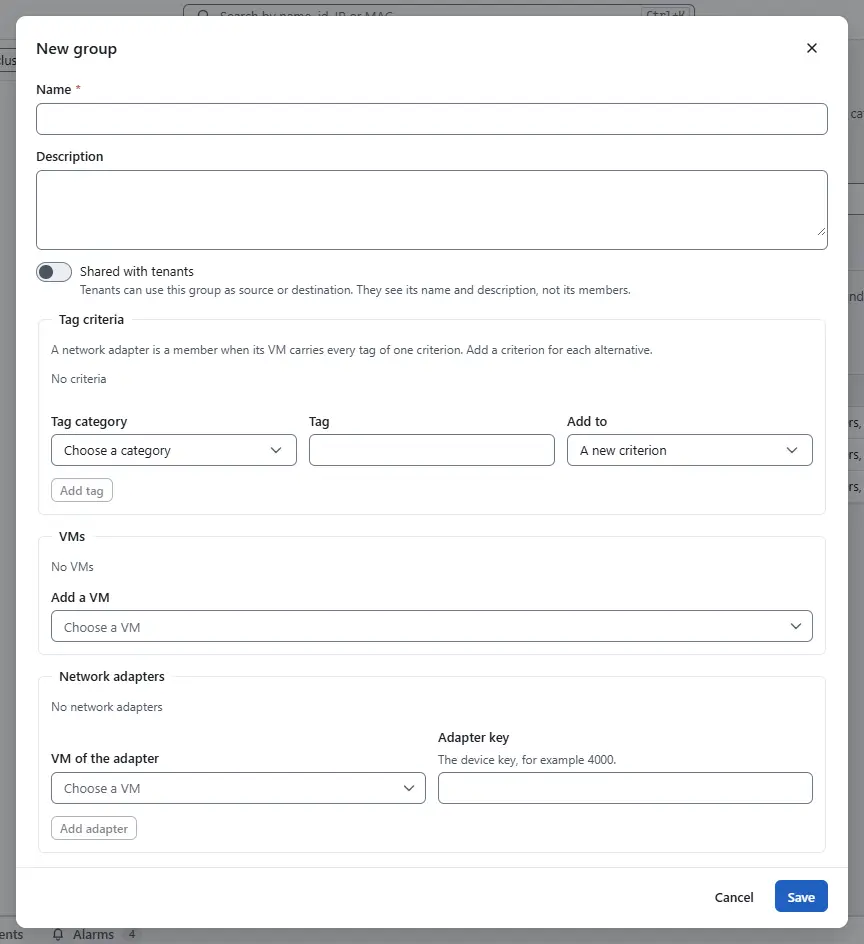
- Select New group. Enter a Name and a Description. Names that start with
sys:are reserved for built-in groups. Then add members in any of these parts:- Tag criteria: choose a Tag category, enter a Tag, choose under Add to whether it starts A new criterion or joins an existing one, and select Add tag. A network adapter is a member when its virtual machine carries every tag of one criterion, so add a criterion for each alternative.
- VMs: select Add a VM. Every adapter of the machine is a member.
- Network adapters: choose the machine under VM of the adapter, enter the device key under Adapter key and select Add adapter.
- Networks: select Add a network. Every adapter on that network is a member.
- Addresses and prefixes: enter an address or prefix, for example 203.0.113.0/24, and select Add. These are addresses outside the platform. To add an address range, enter the first and the last IPv4 address separated by a hyphen under Add an address range and select Add range; the console stores the range as the shortest list of prefixes that covers it exactly.
- MAC addresses: enter a MAC address, for example 00:50:56:aa:bb:cc, and select Add MAC address. Every adapter with that MAC address is a member, whatever its virtual machine. The console writes the address in lower case with colons.
- Nested groups: select Add a group. Groups can nest up to 5 levels deep, and groups cannot contain each other in a loop.
Provider administrators have the switch Shared with tenants, which lets tenants use the group as source or destination without seeing its members. The tag categories that a group can use depend on the scope: provider groups use only categories that the provider manages, tenant groups only the other ones, and the list Tag category shows the ones that fit. The card Tag categories on the tab Settings decides which categories belong to the provider. Select Save.
- To see who is in a group now, select Members on its row. The dialog lists the resolved network adapters with their virtual machine and the resolved addresses.
- To change a group, select Edit. To remove it, select Delete and confirm with Delete group. A group that a policy or another group still uses cannot be deleted. Built-in groups cannot be changed.
Select the tab Services. The table lists the services with their Entries. Services of the platform carry the badge Built in and are read-only.
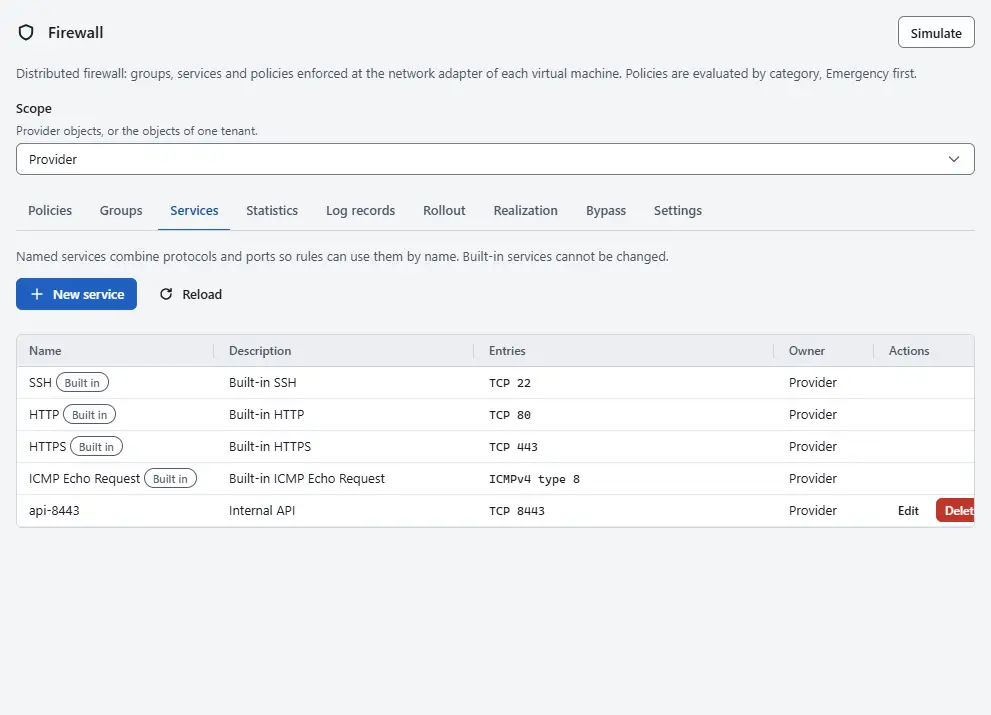
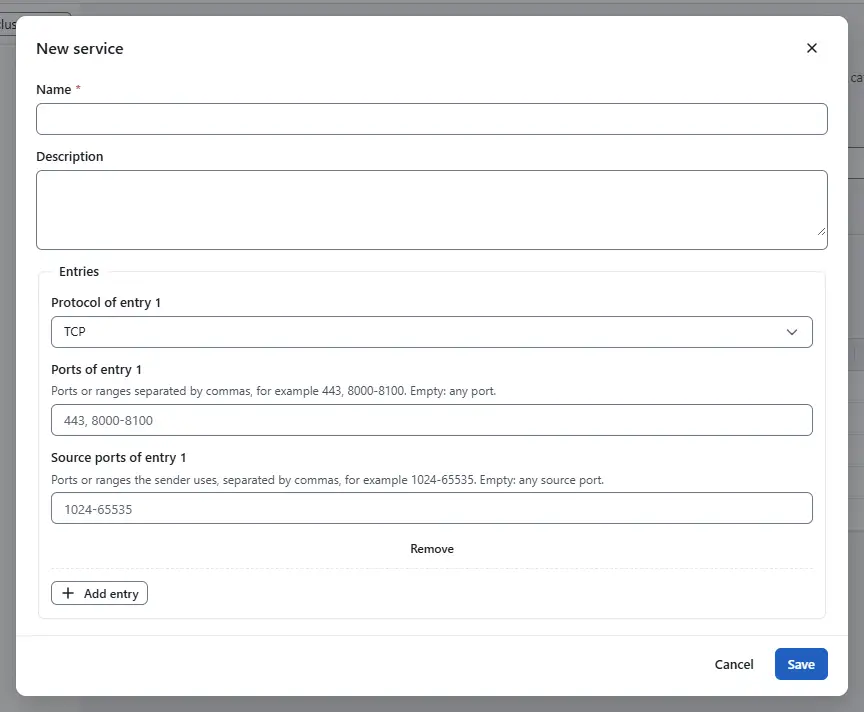
Select New service, enter a Name and a Description, and add entries under Entries with Add entry. A service needs at least one entry. For each entry choose a protocol: TCP, UDP and SCTP take a list of ports or ranges separated by commas, such as 443, 8000-8100, from 1 to 65535, and empty means any port. For these three protocols, Source ports of entry N takes the ports that the sender uses, in the same notation; empty means any source port, and a list shows in the table as, for example, UDP 53 with the source ports 1024-65535. ICMPv4 and ICMPv6 take an ICMP type and an optional code, and a code needs a type. IP protocol number takes a protocol number, for example 47 for GRE. A service cannot contain other named services. Select Save.
- To change a service, select Edit; to remove it, select Delete and confirm with Delete service. A service that a rule uses cannot be deleted. In a rule, choose a service of this list with the protocol Named service.


Result
Groups and services are available in the rule editor at once. A change of a group takes effect in the rules that name it without publishing the policies again, and the console warns when a host has not applied the change yet. In a tenant, groups can hold only the virtual machines, adapters and networks of that tenant, tag criteria count only its machines, and nested groups must be its own or shared groups of the provider. A change over the quota of the tenant fails with error.firewall.quota, and deleting an object in use fails with error.firewall.in_use.
Automation
With the CLI
kyvernon firewall groups create --name web-servers --criterion role=web
kyvernon firewall groups create --name admin-networks \
  --prefix 203.0.113.0/24 --prefix 198.51.100.0/28
kyvernon firewall groups members fwgroup-1
kyvernon firewall services create --name api-8443 --entry tcp:8443 --entry icmp4:8
kyvernon firewall services list
A group can also hold MAC addresses with --mac, and an entry of a service can name source ports after an at sign, such as udp:53@1024-65535. The console offers both.
With the API
GET and POST /v1/firewall/groups list and create groups, GET, PUT and DELETE /v1/firewall/groups/{id} read, replace and delete one, and GET /v1/firewall/groups/{id}/members returns the resolved adapters and addresses. Services use /v1/firewall/services and /v1/firewall/services/{id} the same way. The query tenant selects a tenant scope for a provider user, If-Match carries the version and wait=realized waits for the hosts.
Related
- Rules and policies uses groups and services in rules.
- Tenant isolation explains shared groups and provider tags.
- Firewall reference lists protocols, limits and built-in services.
Version 0.1. Last changed: 2026-11-14