Effective rules and packet simulation
Read the rules that apply to each network adapter of a virtual machine, in evaluation order with hit counters, and simulate a packet to see what decides.
The effective rules of a network adapter are every rule that applies to it, from every policy, in the order in which the firewall evaluates them, followed by the default action of its profile. The simulation tells you what the firewall does with a packet you describe, without sending one. You need the privilege to read the firewall on the virtual machine.
In the console
In the inventory, select the virtual machine and open the tab Firewall. Each network adapter on a host-bridge network has its own card.
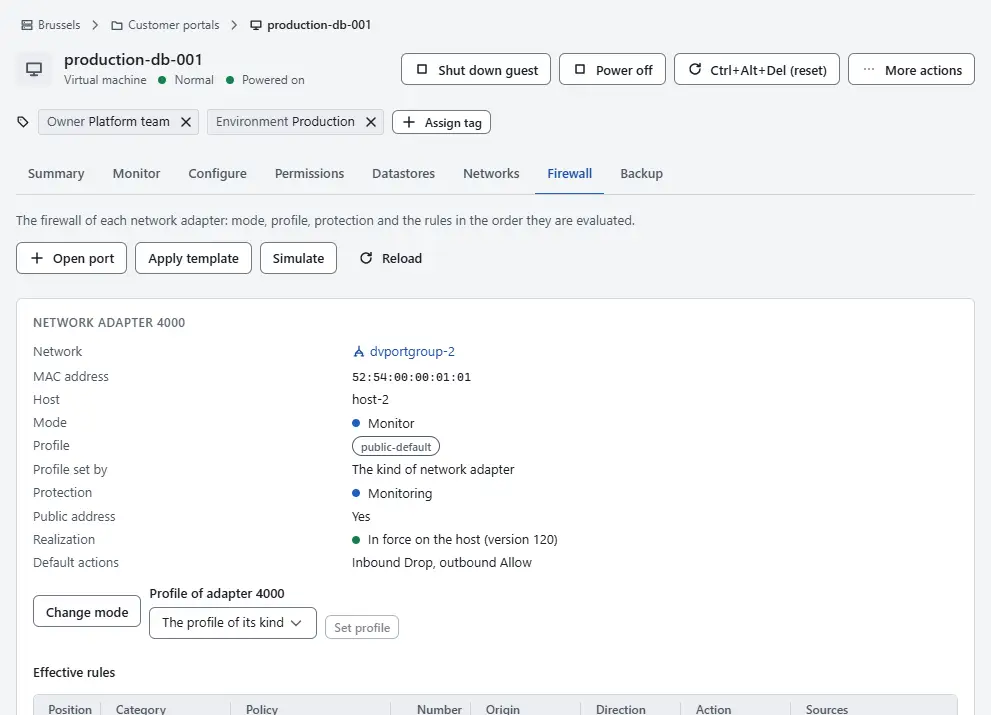
- Read the facts at the top of a card: the Network, the MAC address, the Host and whether the adapter has a Public address. The Mode is Off, Monitor or Enforce. The Profile comes with Profile set by, and Default actions lists what happens when no rule matches.
- Read the Protection: Enforced, Monitoring, Off, or Unprotected with the reason in brackets when the adapter cannot be firewalled. Realization says whether the host applies the latest version of the rules. A mode switch that waits for confirmation shows Pending revert; see Rollout to existing virtual machines.
- Read the warning that starts with Warning when it is there. It means that the adapter has a public address and that the mode is Off, that the adapter is Unprotected, or that it uses the profile
open. In each case every port of the adapter is reachable. - Read the table Effective rules. The rows are in the order of evaluation, and the columns are Position, Category, Policy, Number, Origin, Direction, Action, Sources, Destinations, Services, Stateful and Log. The first rule that matches decides. The Origin says where the rule comes from: Provider, Tenant, Baseline (the baseline policy of the profile), System (a rule that the platform maintains, such as the block of outbound mail) or Default (the default action, shown last with the number n/a).
- Read the counters in the last three columns: Packets, Bytes and Last hit. They count packets that reached the rule on the host. Select Reload to read the latest values.
To see what the firewall does with a packet, select Simulate.
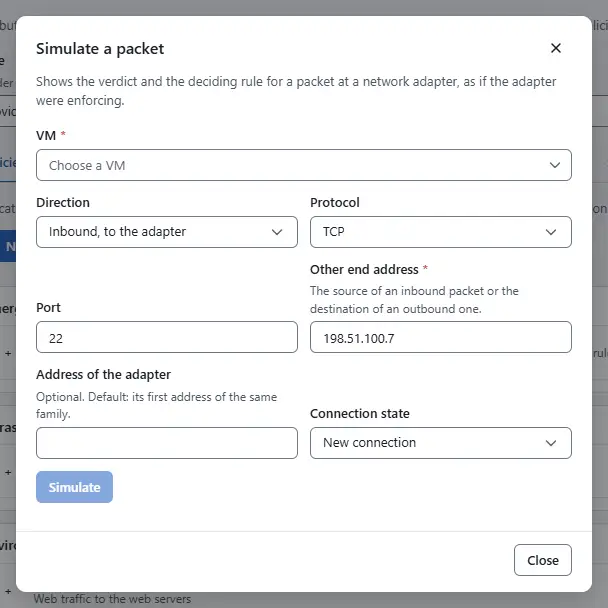
- Choose the Direction: Inbound, to the adapter or Outbound, from the adapter. A virtual machine with more than one adapter also asks for the Network adapter.
- Choose the Protocol and enter the Port. For ICMPv4 and ICMPv6, enter the ICMP type and the ICMP code instead.
- Enter the Other end address: the source address of an inbound packet or the destination of an outbound one. Enter the Address of the adapter only when the adapter has several addresses of the same family. Choose the Connection state: New connection or Established connection.
- Select Simulate. The result shows the verdict and what decided it: a rule with its number, or the connection state, system traffic or the default action. It also shows the policy and category of that rule and the mode of the adapter.


The same simulation is on the page Firewall, where you choose the VM yourself.
Result
The table shows which rule opens or closes a port, and the simulation names the rule that decides for a given packet. Use them before you change a rule, and after a mode switch.
Note
The simulation uses the rules that are published. Edits that wait for publishing in the policy editor are not included. In the mode Monitor a packet that would be dropped is still forwarded and reported, and in the mode Off nothing is evaluated; the result says so.
Automation
With the CLI
kyvernon firewall effective vm-7
kyvernon firewall effective vm-7 --nic 4000
kyvernon firewall simulate --vm vm-7 --in --proto tcp --port 443 --peer 203.0.113.10
With the API
GET /v1/vms/{id}/firewallreturns every adapter of the virtual machine with its effective rules.GET /v1/vms/{id}/nics/{key}/firewallreturns one adapter.POST /v1/firewall/simulatewith{"vm": "vm-7", "direction": "in", "protocol": "tcp", "port": 443, "peer": "203.0.113.10"}.nic,local,state,icmpTypeandicmpCodeare optional.
Related
Version 0.1. Last changed: 2026-11-14