Traffic
Read the monthly traffic of a server in the console and set its limit, the action at the limit and traffic packages.
Kyvernon counts the network traffic of each server per period. You read it, and set the limit and the traffic packages, on the server. Reading the traffic of a server needs the privilege System.View on the server; setting the limit or adding a package needs Network.Config on it.
In the console
- Select the server in the inventory and open the tab Networks.
Find the card Traffic this period.
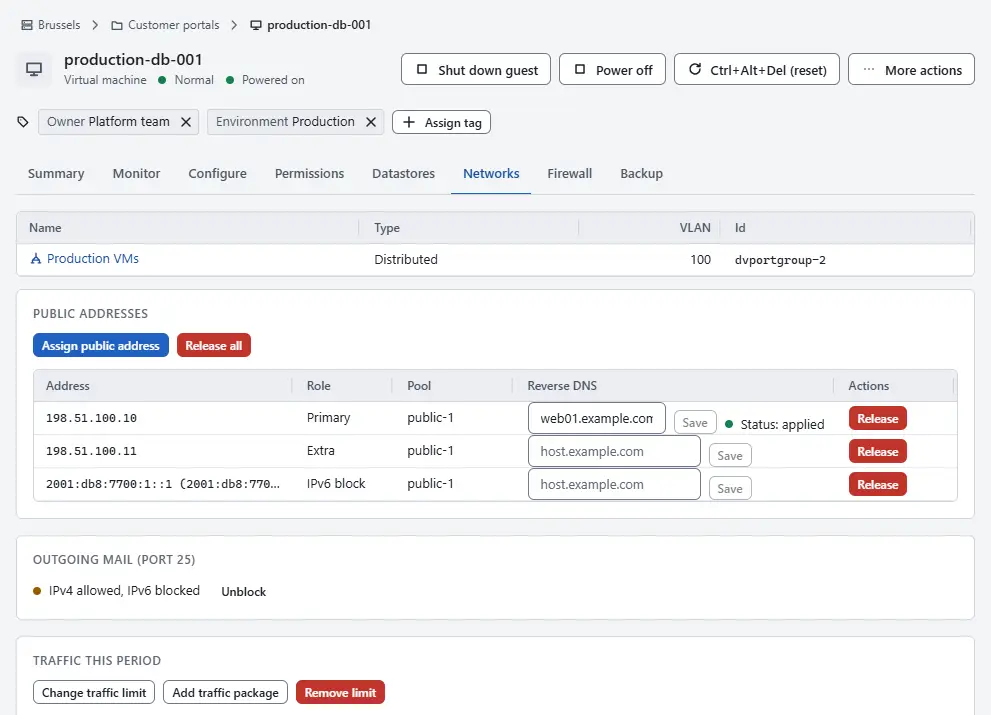
- Read the Period, the traffic Outbound and Inbound, and the Billable traffic, which is the direction that counts against the limit.
- Read the Monthly limit with the share used. The bar turns to a warning at 80 % and to danger at 100 %. A server without a limit shows No limit.
- Check Throttled: Yes means that the server is limited in speed until the period ends.
- Read the chart Traffic per day for the traffic of each day: outbound in the left bar and inbound in the right bar.

Set the limit
- On the card Traffic this period, select Set traffic limit, or Change traffic limit when the server has a limit.
- Enter the Traffic per period and its unit; leave it empty to count without a limit.
- Choose what happens At the limit: Notify only records an event at 80 and at 100 per cent, Notify and throttle also limits the speed until the period ends. For the throttle you can enter the Throttle rate in kbit/s; without a value the default of the site applies.
Optionally enter the Anchor day, 1 to 28, on which the period starts. Without one the day of the tenant or the first of the month applies.
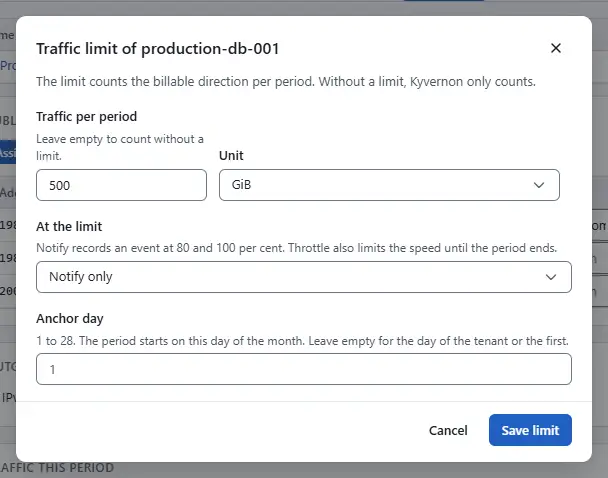
- Select Save limit. The card then shows the action and the traffic packages next to the limit.

Add a traffic package
- Select Add traffic package. It needs a limit.
Enter the Traffic to add and, to protect against a double order, an Order reference. The same reference adds a package once per period.
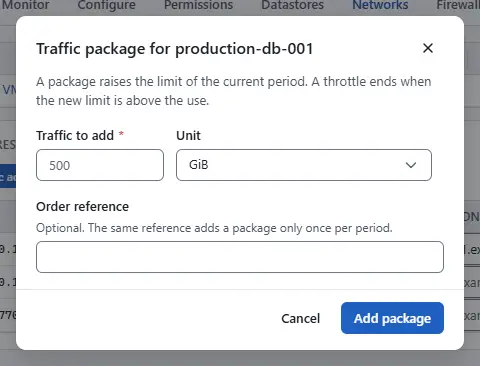
- Select Add package. The limit of the current period rises by the amount. A throttle ends when the new limit is above the use.

Remove the limit
Select Remove limit and confirm. The limit and its packages are removed and a throttle is lifted; Kyvernon keeps counting the traffic.
Result
The card shows how much of the limit the server has used in this period, the action at the limit and the packages added.
How periods, limits and throttling work
- The period is the calendar month in UTC unless an anchor day, 1 to 28, is set per server, per tenant or for the whole site.
- Billable traffic is the outbound traffic by default. The operator of the controller can count the inbound traffic or the larger of the two instead, and sets the anchor days and the throttle speed; see Configuration.
- At 80 % and at 100 % of the limit, Kyvernon records a
traffic.thresholdevent and delivers it to webhook subscribers. - With throttling on, the server is limited to 10 Mbit/s by default, in both directions, until the period ends or a traffic package raises the limit above the use.
Automation
With the CLI
kyvernon traffic vm vm-42                                  # this period, per day
kyvernon traffic report --tenant tenant-a --month 2026-11
kyvernon traffic policy set vm-42 --limit-bytes 2199023255552 --throttle
kyvernon traffic package vm-42 --bytes 536870912000 --reference order-1234
--throttle-kbps sets the throttle speed of one server.
With the API
| Task | Request | Privilege |
|---|---|---|
| Traffic of a server in a period | GET /v1/vms/{id}/traffic?month=YYYY-MM | System.View on the server |
| Traffic per server and tenant | GET /v1/traffic | Kyvernon.Usage.Read |
| Read the limit | GET /v1/vms/{id}/traffic-policy | System.View on the server |
| Set, remove the limit | PUT and DELETE /v1/vms/{id}/traffic-policy | Network.Config |
| Add a traffic package | POST /v1/vms/{id}/traffic-packages | Network.Config |
A month that is not written as YYYY-MM fails with error.traffic.bad_month. Reading the limit of a server that has none fails with error.traffic.no_policy.
Related
- Public addresses assigns the addresses of a server.
- Networking concepts explains the parts of the network.
Version 0.1. Last changed: 2026-11-14