Scheduled tasks
Power a virtual machine on or off once or on a recurring schedule in the console, run a scheduled task at once, edit it and delete it.
A scheduled task powers a virtual machine on or off at a set time, once or on a recurring schedule. A recurring task arms itself again after each run.
In the console
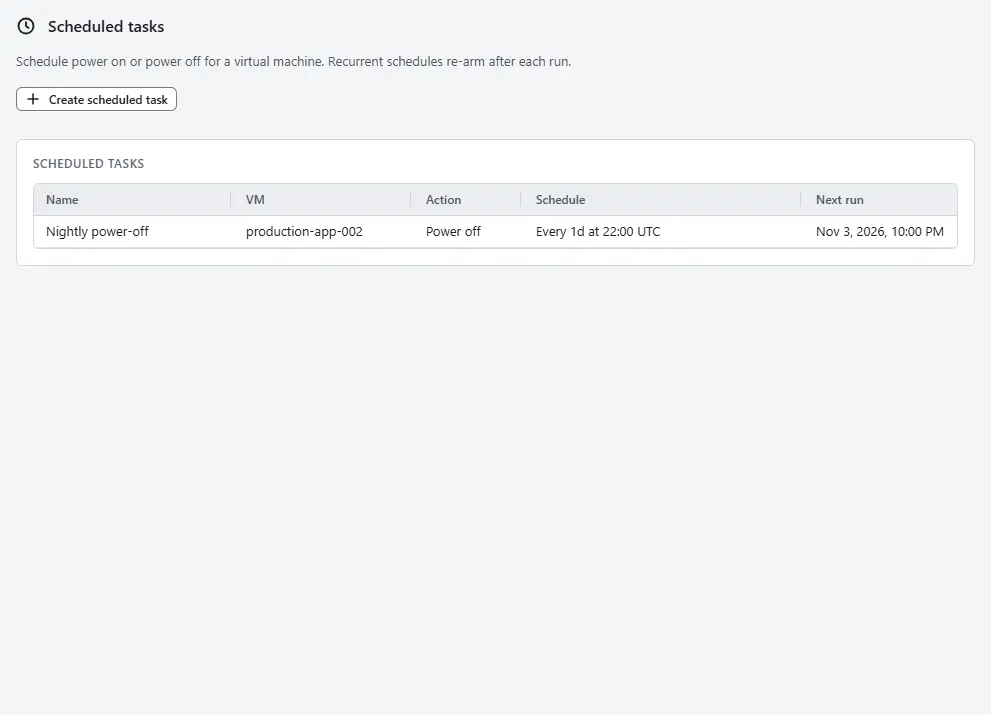
On the home page, select Scheduled tasks. The list shows each task with its virtual machine, its action, its schedule, the Next run and its State.
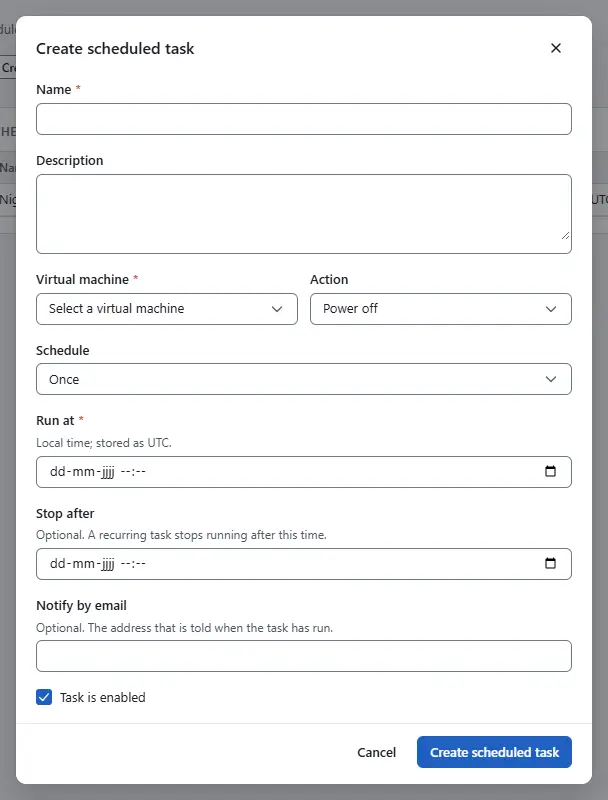
- Select Create scheduled task. The dialog opens. Enter a Name, optionally a Description, and choose the Virtual machine.
- Choose the Action: Power on or Power off.
- Choose the Schedule and fill in what it asks for:
- Once: set Run at. You enter local time and Kyvernon stores it as UTC.
- Hourly: set the Interval in hours and the Minute.
- Daily: set the interval in days, the Hour (UTC) and the minute. The hour is UTC.
- Weekly: set the interval in weeks, the Days of the week, the hour and the minute.
- Monthly by day: set the interval in months, the hour, the minute and the Day of month, from 1 to 31 or -1 for the last day of the month.
- Monthly by weekday: set the interval in months, the hour, the minute, Which one in the month (first to fourth, or last) and the Weekday.
- Optionally set Stop after, after which a recurring task stops, and Notify by email, an address that is told when the task has run. Clear Task is enabled to keep the task without running it.
Select Create scheduled task.


In the list, the state is Queued, Running, Success, Error or Disabled. Run now runs a task at once, Edit changes it, and Delete removes it after a confirmation. A run that is already going is not stopped by a deletion. The virtual machine of a task cannot change: create a new task for another machine.
Result
The task appears with its next run time. After a run, the state changes to Success or Error, and the run is a task in the tasks pane. The notification address is used when the controller has SMTP enabled.
Automation
With the CLI
kyvernon scheduled-tasks create --body-file nightly-off.json
kyvernon scheduled-tasks list --entity <vm-id>
kyvernon scheduled-tasks get <id>
kyvernon scheduled-tasks reconfigure <id> --body-file nightly-off.json
kyvernon scheduled-tasks run <id>
kyvernon scheduled-tasks delete <id>
nightly-off.json powers a virtual machine off every day at 21:30 UTC:
{
  "name": "nightly-off",
  "entityId": "vm-42",
  "action": "power_off",
  "recurrence": {"kind": "daily", "interval": 1, "hour": 21, "minute": 30}
}
With the API
POST /v1/scheduled-tasks takes the body above. PUT /v1/scheduled-tasks/{id} reconfigures a task, POST /v1/scheduled-tasks/{id}/run runs it at once, and GET /v1/scheduled-tasks lists the tasks that the caller may see.
actionispower_onorpower_off.recurrence.kindisonce,hourly,daily,weekly,monthly_by_dayormonthly_by_weekday. Every kind butoncetakesintervalandminute;daily,weeklyand the monthly kinds also takehour.weeklytakes the days as flags,mondaytosunday.monthly_by_daytakesday.monthly_by_weekdaytakesweekday(0 to 6) andoffset, fromfirsttofourthorlast.runAt(RFC 3339) is the time of a one-shot task and defaults to now.enabled,description,activeTime,expireTimeandnotificationare optional.
Related
Version 0.1. Last changed: 2026-11-14