Clone and templates
Clone a virtual machine, convert one to a template and deploy new virtual machines from a template in the console.
A clone is a new virtual machine made from an existing one. A full clone copies the disks and is independent. A linked clone is made from a snapshot and stores only its own changes, as a qcow2 child of the disk of the snapshot. It is ready in seconds and needs the source disks to stay. A template is a virtual machine that is not meant to run: you deploy new machines from it. Every clone gets new MAC addresses.
In the console
To clone a virtual machine:
- In the inventory, select the machine and select Clone under More actions. The clone appears in the same folder.
- Enter a Name.
- For a linked clone, select Linked clone (from a snapshot) and choose the Snapshot. The option is available when the machine has a snapshot, and the clone has to be on the same datastore as the source disks.
Select Power on after clone to start the clone, and select Clone.
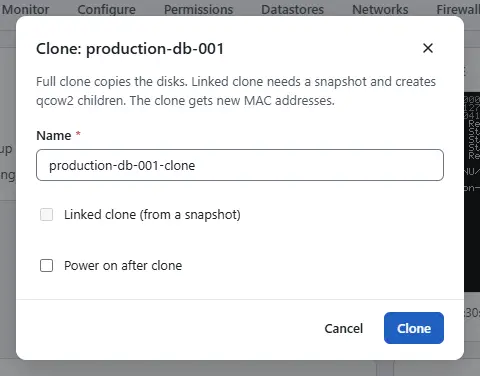

A full clone of a powered-on machine is refused. Power it off, or take a snapshot and use a linked clone.
To make a template, power the machine off and select Convert to template under More actions. A template cannot be powered on or snapshotted, and its page offers Deploy from template instead of Clone. To deploy from it, open the template, select Deploy from template, enter the Name and select Deploy. The disks are copied. Convert to virtual machine turns a template back into a virtual machine.

Result
The clone or the deployed machine appears in the inventory, and the creation is a task in the tasks pane. To give a clone its own host name, keys or network settings, apply a customization profile, see Guest customization.
Automation
With the CLI
kyvernon vm clone <id> --name web-02 --power-on --wait
kyvernon vm clone <id> --name web-03 --linked --snapshot <key> --datastore <datastore> --wait
kyvernon vm clone <id> --name base-image --template --wait
kyvernon vm mark-as-template <id>
kyvernon vm mark-as-vm <id> --resource-pool <pool> --host <host>
Without --folder, --resource-pool, --host and --datastore the clone is made next to the source. --template makes the clone a template. To deploy from a template, clone it:
kyvernon vm clone <template-id> --name web-04 --power-on --waitWith the API
POST /v1/vms/{id}/clone takes name and optionally folderId, resourcePool, host, datastore, linked, snapshot, powerOn and template. linked needs snapshot. Two flags copy more of the source and apply to the same tenant only: copyTags attaches its tags (privilege InventoryService.Tagging.AttachTag on the source) and copyFirewall copies its firewall settings and rules. The answer is a task. POST /v1/vms/{id}/mark-as-template and POST /v1/vms/{id}/mark-as-vm convert in place; the first needs a powered-off machine.
Related
Version 0.1. Last changed: 2026-11-14