Guest operations
Check the guest agent, handle files and run programs inside a running guest through the guest agent in the console; the CLI and the API follow.
Guest operations read and write files and run programs inside a running guest without a network connection to it. They go through the guest agent, a small service in the guest operating system. The console shows the state of the agent and the guest it reports, and has a screen for the operations themselves. The guest has to run, and its agent has to allow the kind of operation you want. The agent of the RHEL family, for example, blocks program execution by default.
In the console
- In the inventory, select the virtual machine and open the Summary tab.
On the card Guest, read the Guest agent. It shows Running, Not running or Not installed. When the agent runs, the card also shows the Hostname, the IP addresses and the Guest OS that it reports.
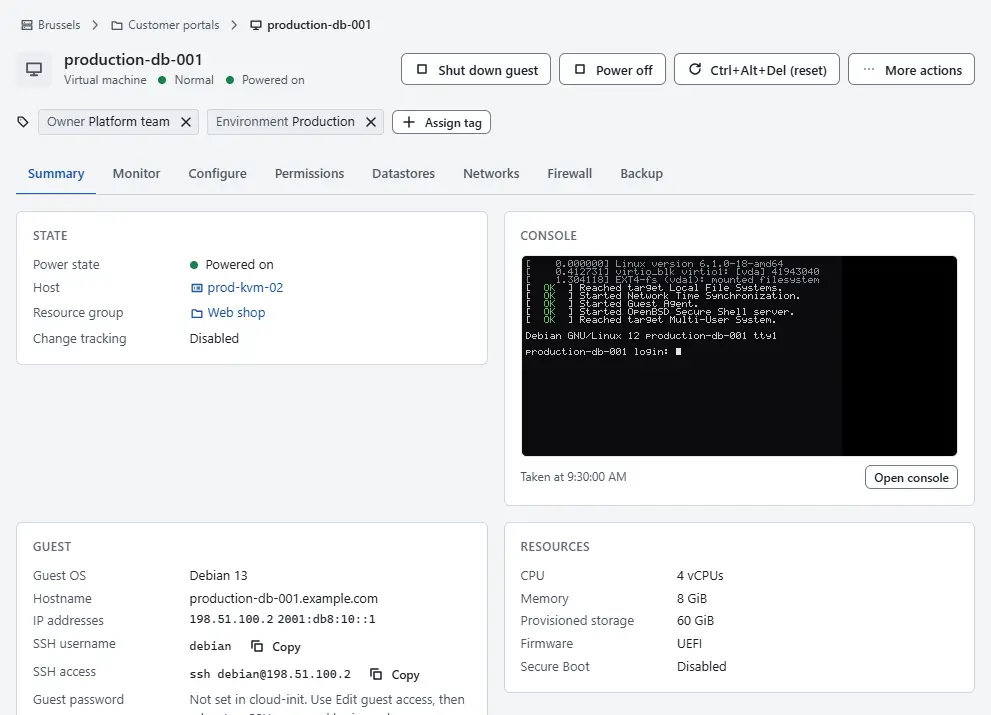
- When the agent is not installed, install it in the guest, or add it to an image with cloud-init, see Guest customization. For a new machine, the wizard step Guest customisation takes the user data for it.
- When the agent refuses operations, change the guest access with Edit guest access under More actions, as described in Guest customization. The API reports which kinds the agent allows, and a note with the remedy when an operation is refused.
To work in the guest, select More actions and Guest operations. The action is offered for a running guest with a running agent, and says why it is off otherwise. Select Check guest operations to see whether guest operations are available.
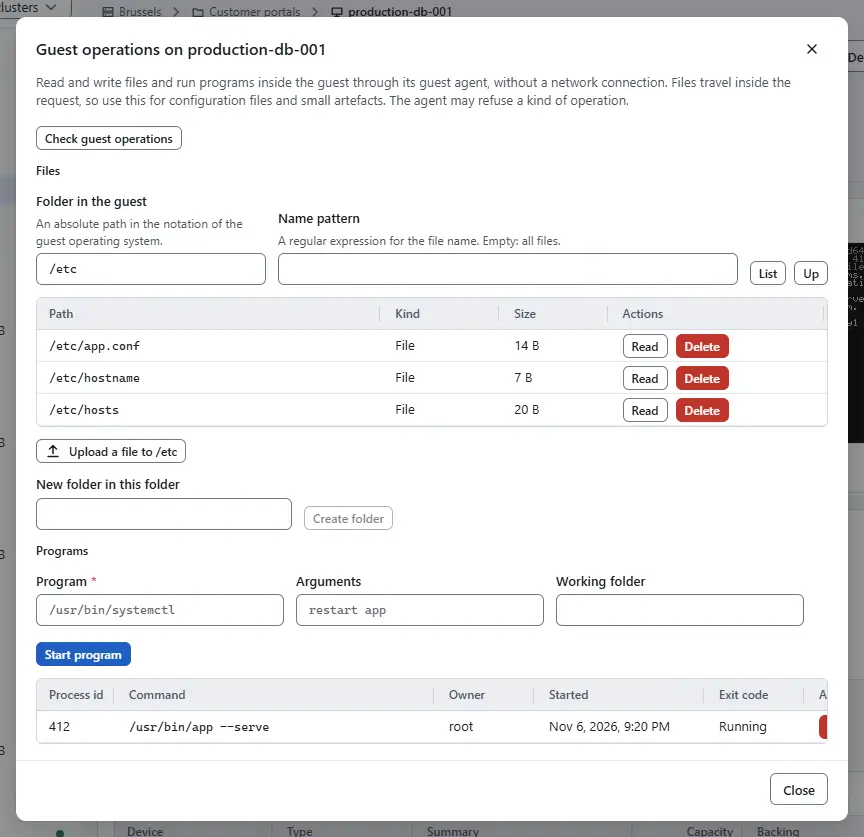
- Under Files, enter a Folder in the guest and select List; narrow the list with a Name pattern. A folder opens when you select its name, and Up goes to the parent. Read shows a file, Delete removes a file or a folder with everything in it after you type its name, Create folder creates a folder in the open one, and the upload button puts a file from your computer into it. Files travel inside the request, so the screen handles files of up to 1 MiB.
- Under Programs, enter the absolute Program, optional Arguments and Working folder, and select Start program. The table lists the programs started through guest operations; End ends one after a confirmation.


Reading needs the privilege VirtualMachine.GuestOperations.Query, writing VirtualMachine.GuestOperations.Modify and running programs VirtualMachine.GuestOperations.Execute; a button that your role does not allow is off.
Result
The card shows a running agent with the data of the guest, and the commands of the Automation section answer instead of failing with error.guest_operations_unavailable.
Automation
With the CLI
kyvernon vm guest validate <id> --username <user>
kyvernon vm guest list-files <id> --path /etc --match-pattern "*.conf"
kyvernon vm guest read-file <id> --path /etc/hostname
kyvernon vm guest write-file <id> --path /tmp/app.conf --from app.conf
kyvernon vm guest mkdir <id> --path /var/lib/app/data --parents
kyvernon vm guest start <id> --program /usr/bin/systemctl \
  --arguments "restart app" --username <user>
kyvernon vm guest list <id>
kyvernon vm guest terminate <id> <pid>
validate probes whether guest operations are available. The other commands:
- Files:
read-file,write-file(replaces unless--no-overwrite),list-files,mkdir,delete-file,rmdir --recursive,move-file --src --dst --overwrite,move-dir,change-attrs,temp-fileandtemp-dir. - Programs:
start,list(programs started through guest operations) andterminate.envreads the environment variables of the guest. - File contents travel as Base64 inside JSON, so they suit configuration files and small artefacts, not large images.
Paths follow the guest operating system.
With the API
| Operation | Request |
|---|---|
| Probe | POST /v1/vms/{id}/guest/credentials/validate, acquire, release |
| Read a file | POST /v1/vms/{id}/guest/files/read |
| Write a file | POST /v1/vms/{id}/guest/files/write |
| List, create, move, delete | POST /v1/vms/{id}/guest/files/list, mkdir, move, move-dir, delete, rmdir, attrs, temp-file, temp-dir |
| Start a program | POST /v1/vms/{id}/guest/processes |
| List or end programs | GET /v1/vms/{id}/guest/processes, DELETE /v1/vms/{id}/guest/processes/{pid} |
| Environment | GET /v1/vms/{id}/guest/environment |
The operations answer at once; they are not tasks. The API reports files_allowed, processes_allowed and a note in operations_note. A refused operation returns error.guest_operations_unavailable or one of the guest file errors, which name the cause. Tools of the vSphere API reach the same functions through the guest operations manager.
Related
Version 0.1. Last changed: 2026-11-14