Snapshots
Take, revert, rename and remove snapshots of a virtual machine in the console, with or without its memory.
A snapshot is a point-in-time copy of the disks of a virtual machine, and optionally of its memory. Kyvernon keeps the snapshots of a machine as a tree and remembers the configuration at the time of each one. Reverting restores that configuration and the disk state.
A snapshot is not a backup: it lives with the disks on the same datastore. Disks set as independent are left out of snapshots, see Edit hardware. A template cannot be snapshotted.
In the console
In the inventory, select the virtual machine and select Snapshots under More actions. The dialog lists the snapshots as a tree, with the current one marked (current), and has the form to take a new one.
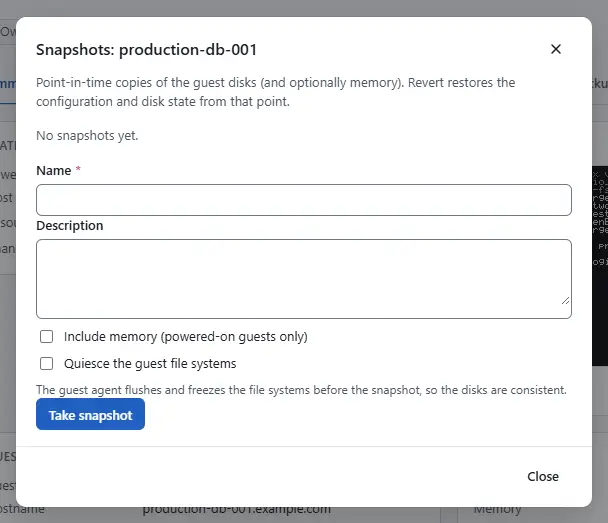
- To take a snapshot, enter a Name of 1 to 80 characters and optionally a Description. Select Include memory (powered-on guests only) to capture the memory as well. That works for a powered-on machine, and a revert then resumes the running guest. Select Quiesce the guest file systems to have the guest agent flush and freeze the file systems before the snapshot, so that the disks are consistent; it needs a running guest with a running guest agent and is off otherwise. Select Take snapshot.
- To go back, select Revert on a snapshot and confirm. Changes made since then are lost.
- To change the name or the description, select Edit on a snapshot, change them and select Save snapshot. Your role needs the privilege to rename snapshots.
- To delete one, select Remove and confirm. The snapshot is merged into the disks and can no longer be reverted to. Remove all snapshots does this for every snapshot of the machine.

Result
The snapshot appears in the list, marked memory when it holds the memory of the guest and quiesced when the file systems were quiesced. After a revert the configuration and the disks are as they were when the snapshot was taken. Each operation is a task in the tasks pane.
Automation
With the CLI
kyvernon vm snapshot create <id> --name before-upgrade --description "Kernel 6.12" --memory --wait
kyvernon vm snapshot revert <id> <key> --wait
kyvernon vm snapshot rename <id> <key> --name after-upgrade
kyvernon vm snapshot remove <id> <key> --children --wait
kyvernon vm snapshot remove-all <id> --wait
<key> is the number of the snapshot within its machine; kyvernon inventory vm <id> lists the snapshots. The options are:
--memorycaptures the memory of a powered-on machine.--quiesceasks the guest agent to quiesce the file systems first, when an agent runs.revert --suppress-power-ondoes not power the guest on after a revert to a snapshot that holds memory.remove --childrenremoves the snapshots below it as well.
With the API
| Operation | Request |
|---|---|
| Take | POST /v1/vms/{id}/snapshots with name, description, memory, quiesce |
| Revert | POST /v1/vms/{id}/snapshots/{key}/revert, optional suppressPowerOn |
| Rename | POST /v1/vms/{id}/snapshots/{key}/rename with name or description |
| Remove one | DELETE /v1/vms/{id}/snapshots/{key}, query removeChildren=true for the subtree |
| Remove all | DELETE /v1/vms/{id}/snapshots |
Take, revert and remove answer with a task. Rename answers at once.
Related
- Clone and templates: a linked clone starts from a snapshot.
- Troubleshooting
Version 0.1. Last changed: 2026-11-14