Move the storage of a virtual machine
Move the disks of a virtual machine to another datastore while it runs or is off, follow the copy, set its rate limit, cancel it and handle a failed check.
A storage migration copies the disk files of a virtual machine to another datastore and switches the machine to the copies. With the licence feature live_migration it does this while the machine runs and without downtime. A powered-off machine moves its files without any licence feature. You need the privilege Resource.HotMigrate for a running machine, Resource.ColdMigrate for a powered-off one, and Datastore.AllocateSpace on every target datastore. The wizard that starts the move is on Relocate; this page covers what the move does and how you follow and control it. To move every virtual machine off a datastore at once, use Datastore maintenance mode, which starts one move for each machine, running or powered off.
In the console
- In the inventory, select the virtual machine and select Migrate under More actions. Select Datastore of the disks, choose the target datastores and the format of each disk, and go on to the step Conditions. The steps are described on Relocate.
Read the conditions. For a running machine the control plane first checks the licence. Without the feature
live_migration(live migration) the move is marked Not met with the reason, and the wizard does not go on. Install a licence that includes the feature, see Licence, or power the machine off and move it then.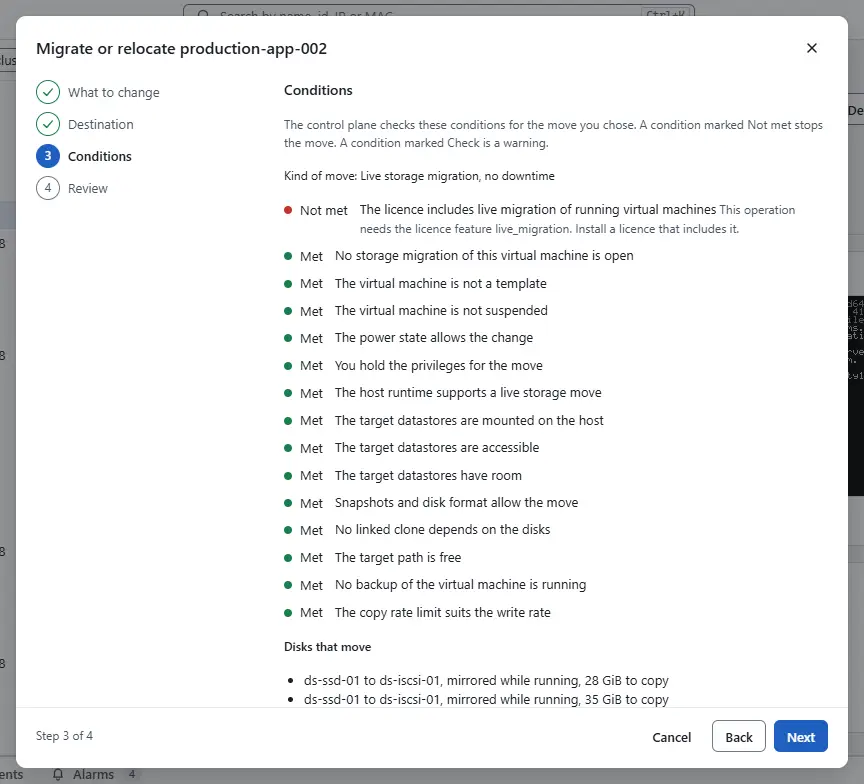
- Review the move and select Start storage migration. The wizard closes when the control plane accepts the move. For a running machine the machine keeps using its current disks until the copy is complete. If the copy fails or you cancel it, nothing changes.
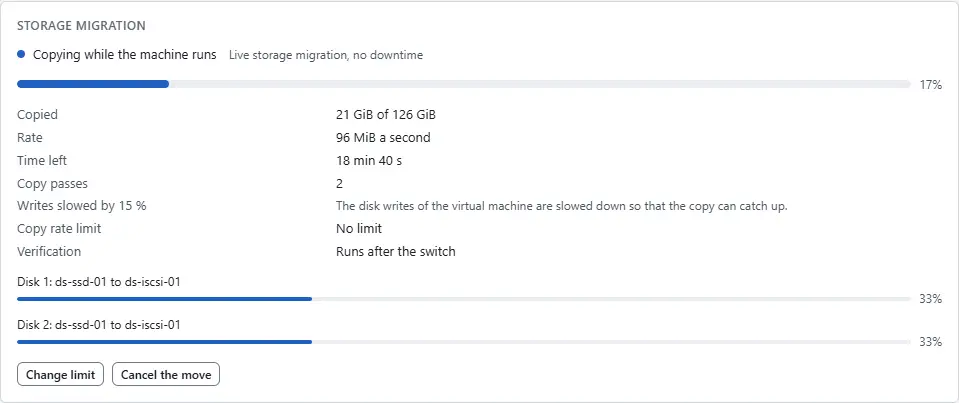
Open the summary of the machine. While the move is open, the card Storage migration shows it and refreshes every 2 seconds:
- the phase: Preparing, Copying snapshot files for the read-only files of snapshots, Copying or Copying while the machine runs, Switching to the new disks, Switched to the new disks, Verifying the copy, and Removing the old files at the end;
- a bar for the whole move and one for each disk, with the datastore it comes from and goes to;
- the Rate, the Time left and, for a running machine, the Copy passes: the copy goes over the disk again for the blocks that the machine wrote in the meantime;
- Writes slowed by ... % when the machine writes faster than the copy can follow. The control plane then slows the disk writes of the machine so that the copy can finish;
- the Copy rate limit and the Verification.
A machine that a move of its disks has opened refuses snapshots, disk changes, clones, backups, export, delete and a second move until the move ends. Power operations, the console and network changes stay possible. The disks list of the hardware table says Moving to ... for each disk that is being copied.
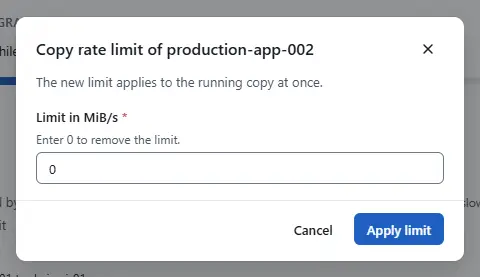
To change the speed, select Change limit, enter the Limit in MiB/s (0 removes the limit) and select Apply limit. The new limit applies to the running copy at once.
- To stop the move, select Cancel the move and confirm with Cancel the move. Before the switch the copy stops, the new files are removed and the machine stays on its current disks. After the switch the card shows The switch is done and the move will complete. in place of the button: the move completes. In the tasks pane the task shows the same phase text, and Cancel or the same note.
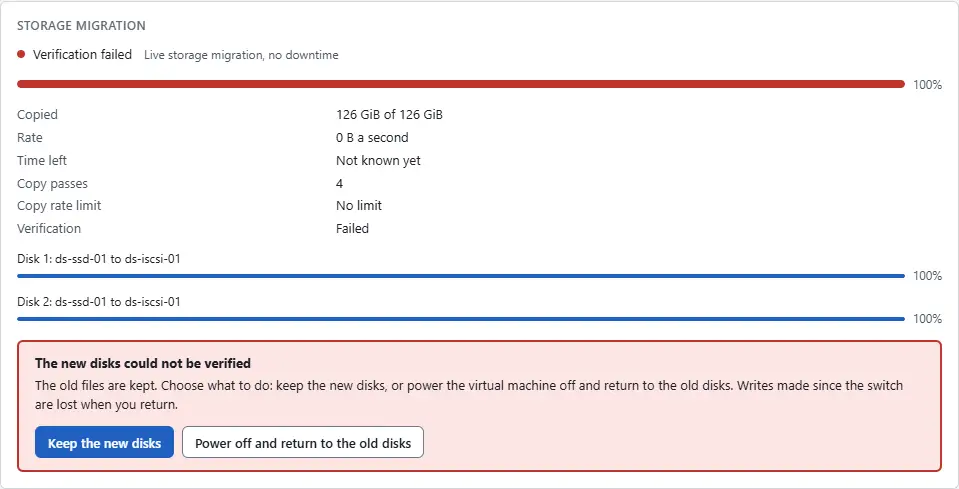
When the comparison after the switch found a difference that it could not repair, the card shows The new disks could not be verified and keeps the old files. Look at the events of the machine for the counts and check both datastores, then choose:
- Keep the new disks: the machine continues on the new disks and the old files are deleted. Use it when you accept the differences or know they do not matter.
- Power off and return to the old disks: the machine is powered off, uses the old disks again, and the new files are removed. The writes made since the switch are lost.
Both ask for a confirmation. The decision is a task of its own, Decide the outcome of a storage migration, and the red alarm of the machine is cleared when you acknowledge it.


Result
The card disappears and the summary shows the new datastores. The old files are gone once the copy is verified. When one of them could not be deleted, a warning event names the files and the report of unused disk images of the datastore lists them; the move itself succeeded. When the verification repaired blocks, a warning event gives the counts: report it, because it points to a fault of the storage.
If the host or the control plane restarts during a move, the card shows Finishing after an interruption. The move is finished or undone from the files as soon as the host answers, with the task Finish storage migration after an interruption.
Automation
With the CLI
kyvernon vm relocate-check <id> --datastore <datastore>
kyvernon vm relocate <id> --datastore <datastore> --follow
kyvernon vm relocation <id>
kyvernon vm relocation-limit <id> --max-bandwidth 50
kyvernon tasks cancel <task>
kyvernon vm relocation-resolve <id> --action keep-target
kyvernon vm relocation-resolve <id> --action return-to-source
relocation shows the phase, the bytes, the rate and the time left of the open move. relocation-limit takes MiB/s and 0 removes the limit. relocation-resolve is for a move whose verification failed.
With the API
GET /v1/vms/{id}/relocation answers the open move with phase, state, bytesCopied, bytesTotal, rateBytesS, etaSeconds, passes, throttlePercent, maxBandwidthMibS, verify, cancelable, a list of disks and error; the answer is 404 when no move is open. PATCH /v1/vms/{id}/relocation takes maxBandwidthMibS. POST /v1/vms/{id}/relocation/resolve takes action, keepTarget or returnToSource, and answers a task. A cancel is POST /v1/tasks/{id}/cancel on the task that the move returned. The result of the move task has kind, relocatedDisks, stallMs, verify and leftover.
Related
Version 0.1. Last changed: 2026-11-15