Content libraries
Create a content library on a datastore in the console, register or upload ISO and OVF items, and use the items.
A content library is a catalogue of ISO and OVF files. A library is backed by one datastore, and an item points to a file on it. You can register a file that is already there, or upload a file into a new item. The items of type ISO can be chosen when you attach an ISO image to a virtual machine, see Edit hardware. You need a datastore with free space.
In the console
On the home page, select Content libraries.
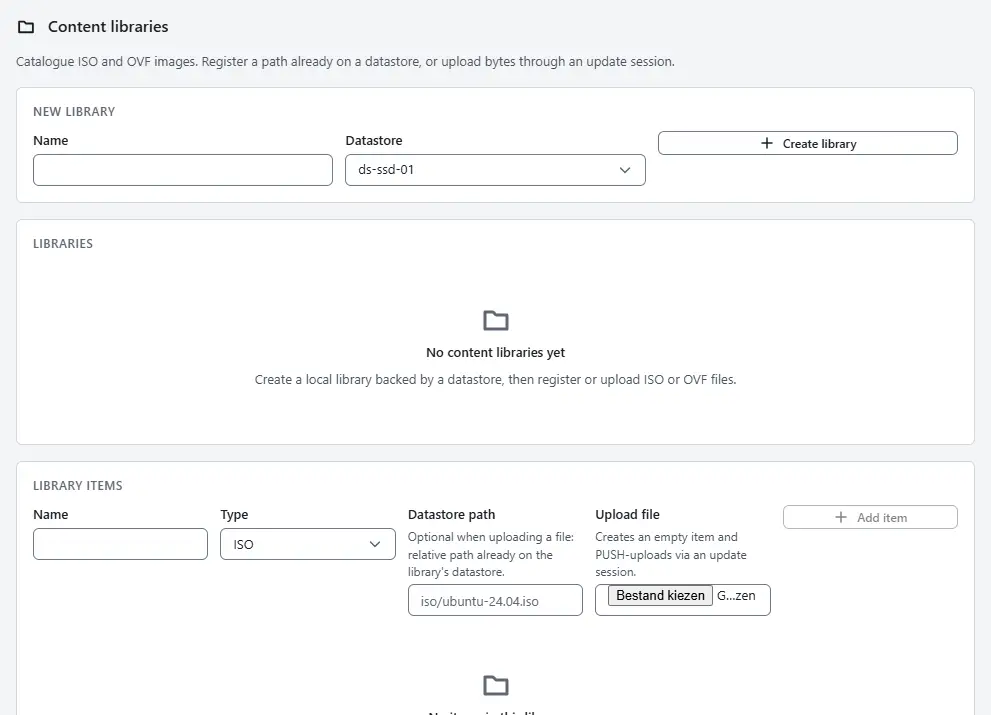
- Under New library, enter a Name, choose the Datastore and select Create library. The library appears in the list Libraries.
- Select the library in the list. The section Library items shows its items.
- To add an item, enter a Name and choose the Type, ISO or OVF/OVA.
- Either enter the Datastore path of a file that is already on the datastore, or choose a file under Upload file. An upload creates an empty item and sends the file to the datastore of the library.
- Select Add item, or Upload when you chose a file.

Delete removes a library and Delete removes an item. The files on the datastore are listed in Files on a datastore.
Result
The item is listed with its type and the datastore path of its file. ISO items are offered in the dialog that edits the hardware of a machine, under From content library.
Automation
With the CLI
kyvernon content libraries create images --datastore <datastore> --description "ISO images"
kyvernon content items create ubuntu-26.04 --library <library> --type iso \
  --file-path iso/ubuntu-26.04.iso
kyvernon content items list --library <library>
To upload a file into an empty item, open an update session, add the file, upload it and complete the session:
kyvernon content items create tools --library <library> --type iso
kyvernon content sessions create <item>
kyvernon content sessions add-file <session> tools.iso --size 734003200
kyvernon content sessions upload <session> tools.iso ./tools.iso
kyvernon content sessions complete <session>
sessions cancel abandons a session and sessions files lists its files. Further commands: libraries list, get and delete; items get and delete; sessions list and get. The types of an item are iso, ovf and vm-template.
With the API
| Operation | Request |
|---|---|
| Libraries | GET, POST /v1/content/libraries; GET, DELETE /v1/content/libraries/{id} |
| Items | GET, POST /v1/content/library-items; GET, DELETE /v1/content/library-items/{id} |
| Update sessions | GET, POST /v1/content/update-sessions; GET, DELETE /v1/content/update-sessions/{id} |
| Add a file to a session | POST /v1/content/update-sessions/{id}/files |
| Send the file | PUT /v1/content/update-sessions/{id}/files/{name}/content |
| Complete | POST /v1/content/update-sessions/{id}/complete |
A library is created with name, datastoreId and an optional description. An item takes libraryId, name, type and either filePath or nothing, for an upload. Libraries are local to the controller; their type is always LOCAL.
Related
Version 0.1. Last changed: 2026-11-14