iSCSI
Enable software iSCSI on a host in the console, add discovery and static targets, set CHAP, rescan and create a datastore on a LUN.
A host reaches iSCSI storage through its software iSCSI adapter. You turn the adapter on, tell it where the targets are, rescan to find the LUNs, and create a datastore on a LUN. The licence must include the feature remote_storage.iscsi, and you need the privilege Host.Config.Storage on the host. Have the addresses of the portals of the storage array at hand, for example 198.51.100.10, the name (IQN) of each target for static targets, and the CHAP user name and secret when the array asks for them.
In the console
In the inventory, select the host, open the Configure tab and select the area iSCSI.
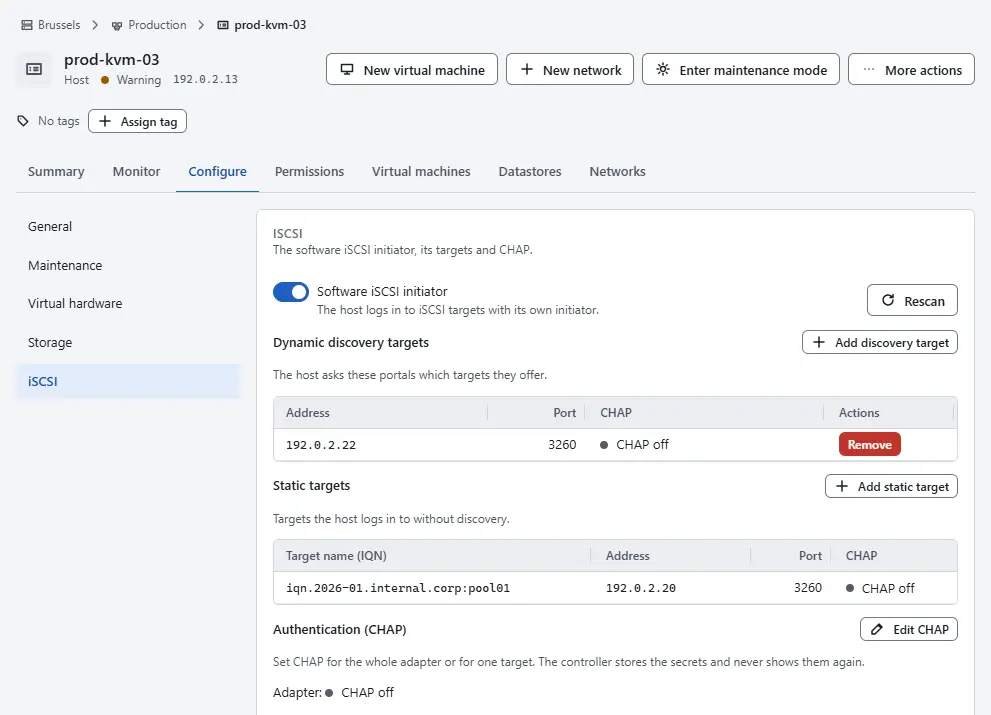
- Turn on Software iSCSI initiator. While it is off, the page says so and the targets and the rescan are not available.
- To use dynamic discovery, select Add discovery target, enter the address of the portal, a host name or an IP address, and the port, 3260 by default, and select Add. The host asks the portal which targets it offers. The table Dynamic discovery targets lists them.
When you know the target, select Add static target instead. Enter the Address, the Port and the Target name (IQN), which starts with
iqn.oreui., and select Add.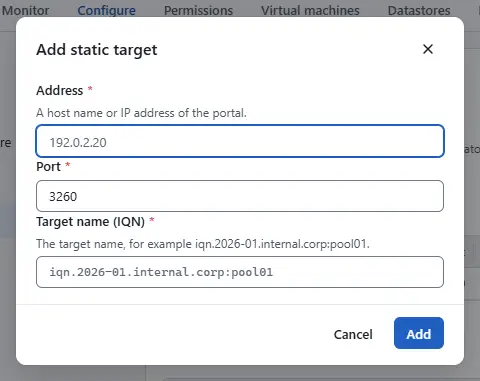
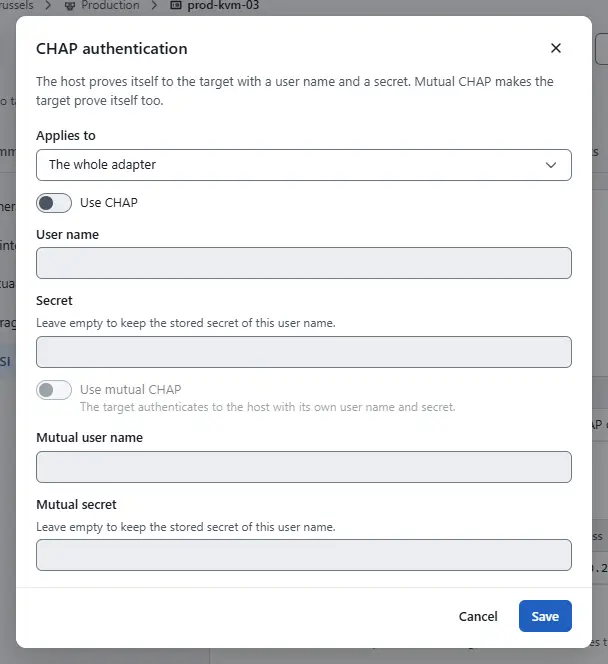
When the array needs CHAP, select Edit CHAP. Under Applies to choose the whole adapter or one target, turn on Use CHAP, enter the User name and the Secret, and for mutual CHAP turn on Use mutual CHAP and enter the second pair. Select Save. The controller stores the secrets and never shows them again. Leave the secret empty to keep the stored one of the same user name.
- Select Rescan. The host logs in to the targets and the table LUNs the host sees lists what it sees: the device, the LUN number, the size and the target. A LUN with several paths appears once.
- To create the datastore, select Add datastore under More actions of the host, choose the type iSCSI LUN, enter a name and choose the LUN, then select Add datastore. Datastores describes the dialog.


Warning
A blank LUN receives a file system when the datastore is created. A LUN that already carries other data is refused. Check the LUN in the table before you create the datastore.
To remove a target, select Remove on its row and confirm. The host stops using it, and datastores on its LUNs become inaccessible from this host. Turn the initiator off with the same switch as in step 2.
Result
After the rescan the host lists the LUNs of the targets it logged in to. After the datastore is created it appears in the inventory with the type Block (iSCSI, FC), and files can be stored on it.
Automation
With the CLI
kyvernon host set-software-iscsi <host> --enabled
kyvernon host add-iscsi-send-targets <host> --address 198.51.100.10
kyvernon host add-iscsi-static-targets <host> --address 198.51.100.10 \
  --iqn iqn.2026-11.com.example:array1.vol1 --port 3260
kyvernon host set-iscsi-auth <host> --chap-enabled --chap-name <user> --chap-secret <secret>
kyvernon host rescan-all-iscsi <host>
kyvernon host vmfs-disks <host>
kyvernon host create-datastore <host> --type vmfs --name san-01 --disk <canonical-name>
<host> is the identifier of the host, such as host-1. The port is 3260 when you leave it out. set-iscsi-auth also takes --mutual-chap-name and --mutual-chap-secret, and --chap-disabled clears CHAP of the adapter. rescan-iscsi takes one adapter, vmhba64 by default. vmfs-disks lists the LUNs that can hold a datastore, each with its canonical name (naa.…), capacity, target, portal and LUN number; a LUN with several paths shows its multipath device under /dev/mapper. vmfs-create-options --device-path <device> shows the options for one device, and the datastore is named by canonical name, WWID or device path. To remove a target, use remove-iscsi-send-targets or remove-iscsi-static-targets with the options of adding it. To turn the adapter off, run set-software-iscsi --disabled.
With the API
| Operation | Request |
|---|---|
| Enable or disable | PUT /v1/hosts/{id}/iscsi/software with {"enabled": true} |
| Send targets | POST or DELETE /v1/hosts/{id}/iscsi/send-targets with {"targets": [{"address": "198.51.100.10"}]} |
| Static targets | POST or DELETE /v1/hosts/{id}/iscsi/static-targets with address, iqn and port per target |
| CHAP | PUT /v1/hosts/{id}/iscsi/authentication |
| Rescan | POST /v1/hosts/{id}/iscsi/rescan (optional hbaDevice) and POST /v1/hosts/{id}/iscsi/rescan-all |
| List LUNs | GET /v1/hosts/{id}/vmfs-disks, GET /v1/hosts/{id}/vmfs-create-options |
| Create the datastore | POST /v1/hosts/{id}/datastores with type vmfs, name and disk |
The CHAP request takes chapAuthEnabled, chapName, chapSecret, the mutual fields mutualChapAuthenticationType, mutualChapName and mutualChapSecret, and optionally a targetSet with sendTargets and staticTargets to set CHAP for those targets only. Leave out chapSecret to keep the stored secret of the same name.
Related
Version 0.1. Last changed: 2026-11-14