Datastores
Add a local, NFS or iSCSI datastore to a host in the console, mount it on more hosts, unmount or remove it, and read the datastores of the inventory.
A datastore is added through one host. The host agent mounts or creates the storage, and the datastore appears in the inventory of the datacenter once a host mounts it. You need the privilege Host.Config.Storage on the host. For a local datastore you need an absolute directory on the host that exists and has enough free space. For an NFS datastore you need the address of the NFS server and the path of the export, both reachable from the host, and a licence that includes the feature remote_storage.nfs. A datastore on an iSCSI LUN needs the iSCSI setup first, see iSCSI.
In the console
To add a datastore:
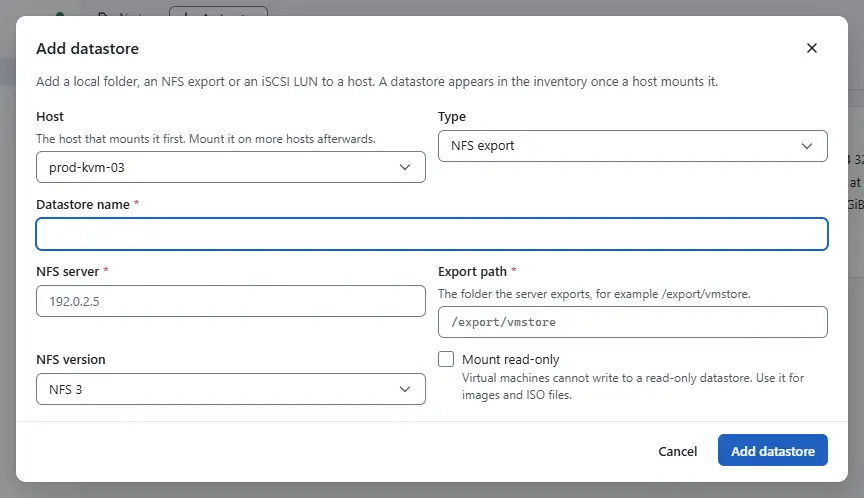
- In the inventory, select the host and select Add datastore under More actions. The same action is in the area Storage of the Configure tab of the host. The dialog Add datastore opens.
- Choose the Host, the host that mounts the datastore first, and the Type: Local folder, NFS export or iSCSI LUN.
- Enter the Datastore name, 1 to 80 characters without slashes.
- Fill in what the type asks for:
- Local folder: the Path on the host, an absolute path of a folder on the host.
- NFS export: the NFS server, the Export path that starts with a slash, the NFS version (NFS 3 or NFS 4.1) and, for images and ISO files, Mount read-only.
- iSCSI LUN: the LUN. The list shows the LUNs that the host sees through its iSCSI targets and that no datastore uses yet. The LUN is formatted as a block datastore, so check that it holds nothing you need.
Select Add datastore.

To read a datastore, select it in the inventory. The summary shows its Type, Capacity, Used and Free space, its Path and the hosts that mount it. The Hosts area of the Configure tab lists the hosts.

To mount an NFS datastore on more hosts, select Mount on hosts under More actions, choose the hosts of the datacenter that do not mount it yet and confirm. A block datastore is mounted by the host that sees the LUN, after a rescan. Unmount works the other way: choose the hosts that stop mounting the datastore. The data stays where it is. A datastore that a running virtual machine uses cannot be unmounted from that host, and the dialog counts the machines that block it. When some hosts fail, the dialog says how many.
To remove a datastore:
- Select Remove datastore under More actions of the datastore.
Type the name of the datastore and confirm. The datastore is unmounted from all its hosts and leaves the inventory. The files on the storage are not deleted.
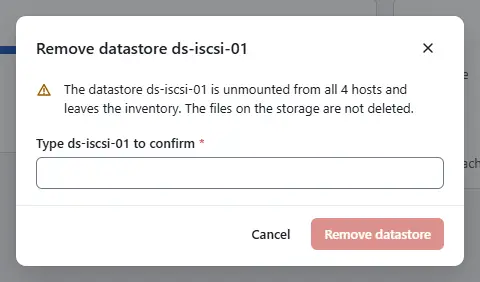

A datastore that a virtual machine uses cannot be removed.
Result
The datastore appears under the datacenter, accessible from the host, and its size and free space are what a host measured, at most five minutes ago. Each change is a task in the tasks pane.
Automation
With the CLI
Add a local datastore. <host> is the identifier of the host, such as host-1:
kyvernon host create-datastore <host> --type local --name images --path /srv/kyvernon/imagesAdd an NFS datastore:
kyvernon host create-datastore <host> --type nfs --name shared-01 \
  --remote-host 192.0.2.20 --remote-path /export/vm --nfs-type NFS41
--nfs-type is NFS (version 3) or NFS41. --access-mode is readWrite or readOnly, and --security-type the NFS security flavour, sys by default. A datastore on an iSCSI LUN uses --type vmfs, see iSCSI. Remove a datastore from the host and read the datastores:
kyvernon host remove-datastore <host> <datastore>
kyvernon inventory datastores
kyvernon inventory datastore <datastore>
Size and free space are measured by a connected host that mounts the datastore. The leader controller measures every datastore every five minutes; placement and the space checks of new disks use these values. Measure one now, for example after files were added on the storage outside Kyvernon:
kyvernon datastore refresh <datastore>The answer holds capacityBytes, freeBytes, the host that measured them (measuredOn) and refreshedAt. Without a connected host whose agent can measure the datastore, the command fails with error.datastore_no_host.
With the API
POST /v1/datastores/{id}/refresh measures the datastore on a host now and stores the result (System.Read on the datastore).
POST /v1/hosts/{id}/datastores takes type (local, nfs or vmfs), name and the fields of the type: path for a local datastore; remoteHost, remotePath, nfsType, accessMode and securityType for NFS; disk for iSCSI. It answers 201 with the new datastore. DELETE /v1/hosts/{id}/datastores/{dsId} removes it. GET /v1/inventory/datastores lists the datastores and GET /v1/inventory/datastores/{id} reads one, with datastore_type, capacity_bytes, free_bytes, accessible and hosts.
Related
Version 0.1. Last changed: 2026-11-14