Licence
Read the effective entitlements of a management domain, install a signed licence offline and remove it, in the console.
Without a licence file a management domain runs on the free tier: one host, up to 10 running virtual machines and local storage only. A licence is a signed file that raises the limits and adds features. It is installed offline: the controller does not contact any server to check it. Installing and removing a licence needs the privilege Global.Licenses; without it the page shows You cannot install or remove licences.
In the console
Read the entitlements
On the page Home, select Licence.
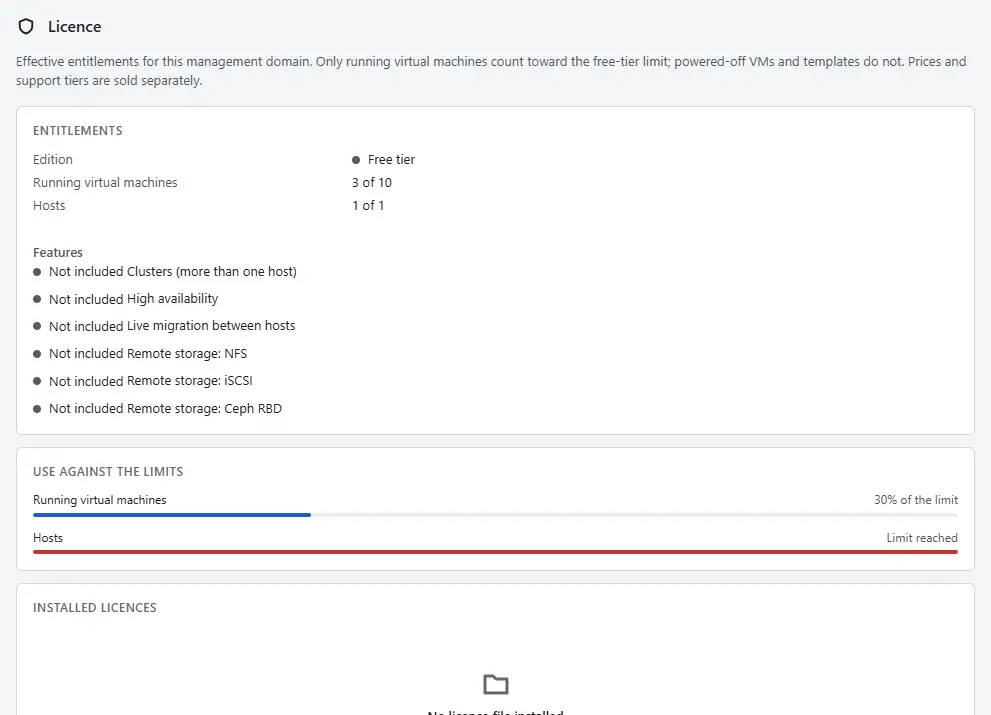
- The card Entitlements shows Edition (Free tier or Licensed), Running virtual machines and Hosts as current of limit, Expires and the Features, each marked Included or Not included.
- The card Use against the limits shows the use against each limit. At the limit it shows Limit reached.
- The card Installed licences lists each licence file with Licence id, Licensee, Installed and Valid: Valid or Expired or not yet valid.

Install a licence
You need two files from the issuer of the licence: the payload and its detached signature. Install them as received. The signature is checked against the key built into the controller, and an edited payload is refused (error.licence.signature_invalid). A licence outside its validity window is refused too (error.licence.not_valid).
- In the card Install licence, select Choose payload file and choose the payload file, or paste its text into Licence payload.
- Select Choose signature file and choose the signature file, or paste its text into Signature. A file larger than 256 KiB is refused.
- Select Install. The new licence appears under Installed licences, and the limits change at once.
Remove a licence
Removing a licence does not stop virtual machines that run. Limits fall back to those of the remaining files, or to the free tier.
- In the card Installed licences, select Remove on the row of the licence.
- Confirm.
What the licence limits
- Running virtual machines. Powered-on, paused and suspended virtual machines count. Powered-off virtual machines and templates do not. Creating, cloning, importing and keeping virtual machines powered off is never limited.
- Hosts. Adding a host beyond the limit is refused.
- Features. The page lists them under Features.
| Feature | Console label |
|---|---|
cluster | Clusters (more than one host) |
ha | High availability |
live_migration | Live migration between hosts |
remote_storage.nfs | Remote storage: NFS |
remote_storage.iscsi | Remote storage: iSCSI |
remote_storage.ceph | Remote storage: Ceph RBD |
A refused operation fails with one of the codes of the licence errors and names the limit and the current count. A licence never stops a running virtual machine and never touches data: when a licence expires or is removed, running virtual machines keep running and only new power-ons and new remote datastores are refused. Several licence files can be installed together; the effective limit per kind is the highest of the valid files, and the features are the union.
Automation
With the CLI
kyvernon licence show
kyvernon licence install licence.json licence.json.minisig
kyvernon licence remove <licence-id>
With the API
| Action | Request |
|---|---|
| Read entitlements, counters and installed licences | GET /v1/licence |
| Install | POST /v1/licence/install with {"payload": "<text of the payload>", "signature": "<text of the signature>"} |
| Remove | DELETE /v1/licence/{id} |
Related
Version 0.1. Last changed: 2026-11-14