Upgrade
Upgrade the controller and the hosts from a new offline depot, follow the versions in the console, and what the first start of a version changes.
An upgrade installs the packages of a new version over the old ones from a new offline depot. The services restart, virtual machines keep running while the agent of a host restarts, and configuration files are not overwritten. The installer runs on each machine; the console shows the versions before and after. The release notes of the version list changes that need an action: Release notes.
In the console
On the page Home, select Upgrade status. The card Controller shows the Version of the controller, the API version, Running for and the Role. The table Hosts shows the version of the agent on every host.
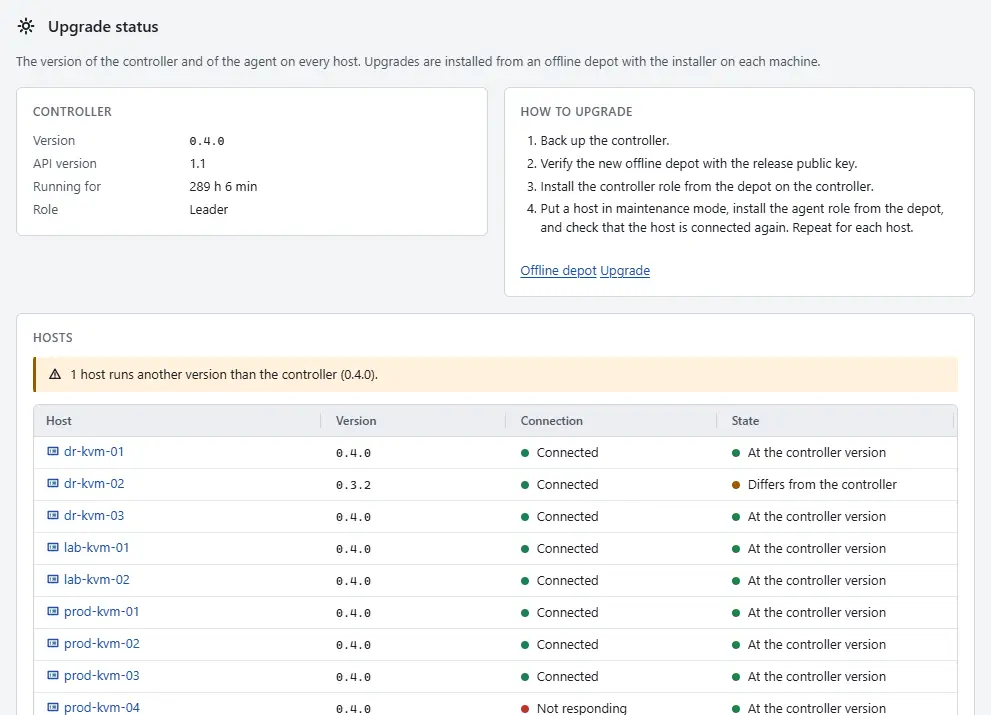
- Back up the controller. Select Backup, then Back up the controller now; see Back up the controller. Check that the disk of the controller has room for a second copy of the store (
inventory.redb). - Verify the new depot with the release public key on the machine: Offline depot. Read the release notes and the upgrade note below.
- Install the controller role from the new depot on the controller machine; the command is in Automation. The service restarts and the console reconnects.
- Upgrade the hosts one at a time. The agent and the VMM of a host are installed together at the same version. The agent restarts and its virtual machines keep running. When a host must be free of virtual machines for other work, select the host and select Enter maintenance mode first, after moving or powering off its machines (maintenance mode). Install the agent role on the machine, then check that the host is Connected again before you continue with the next host. End maintenance mode with Exit maintenance mode.
- Return to Upgrade status. The column State shows At the controller version for every host. A host with another version than the controller shows Differs from the controller, and a warning above the table counts them.

Result
The card Controller shows the new version, and every host reports the same agent version in the table Hosts.
Upgrade note: history on disk
An upgrade needs no action for these: an existing store and metrics file open as they are, with one exception.
The first start of this version moves tasks, events and audit records from the snapshot into tables of inventory.redb. It writes a snapshot at once to do so, and before that copies the closed store to /var/lib/kyvernon/controller/inventory.redb.before-history-on-disk unless the operator turned that copy off. Leave room on the disk for a second copy of the store, and remove the copy when the controller runs well. The store file now holds the history text, up to the history size limit plus the audit records; see Configuration.
To go back to a previous version, the operator switches the history on disk off in the controller configuration and starts the controller once: it loads the history into memory (it refuses above 512 MiB of text unless the operator forces it) and rewrites the snapshot in the previous format. Then stop it and install the previous version. A previous version cannot open a store that history was moved into. Restoring the copy made before the upgrade also works but loses what was written since.
Automation
With the CLI
On the controller, install the controller role from the new depot. The command is the one used for the first installation:
sudo ./kyvernon-install --role controller --pubkey /path/to/release-signing.minisign.pubA configured service that was running is restarted by the upgrade. Configuration files in /etc/kyvernon are never overwritten: compare them with the new skeletons in /usr/share/kyvernon/ for new keys, then check the configuration:
diff /etc/kyvernon/controller.toml /usr/share/kyvernon/controller.toml.example
sudo kyvernon-controller --config /etc/kyvernon/controller.toml check-config
kyvernon system ready
Then upgrade the hosts, one at a time:
sudo ./kyvernon-install --role agent --pubkey /path/to/release-signing.minisign.pubkyvernon about on a machine with the command-line client shows the version of the controller, and kyvernon inventory host <id> shows the agent version of a host.
With the API
GET /v1/about returns the version of the controller, and GET /v1/inventory/hosts/{id} the agent version of a host. The API has no call that installs an upgrade.
Related
Version 0.1. Last changed: 2026-11-14