Back up the controller
Back up the state of the controller from the console, on request or on a schedule, and restore it on the same or a new machine.
The controller keeps its state in one directory, /var/lib/kyvernon/controller. It holds the inventory, the users, roles and permissions, the tasks, events and audit records, the licence, the keys of the installation and the TLS certificate that hosts trust. A copy of that directory and of the configuration restores the controller.
The copy does not contain virtual machine disks or datastore files: they are on the hosts and on the storage behind them. Back those up as described in Back up a virtual machine. Starting a copy needs the privilege Global.Settings.
In the console
- On the page Home, select Backup. The tab Overview opens.
Read the card Backup of the controller. State is Healthy, The last backup failed or Disabled. The card also shows Last backup, Size of the last copy, Next backup, Schedule, Copies kept, the directory Copies go to and the directory State directory copied.
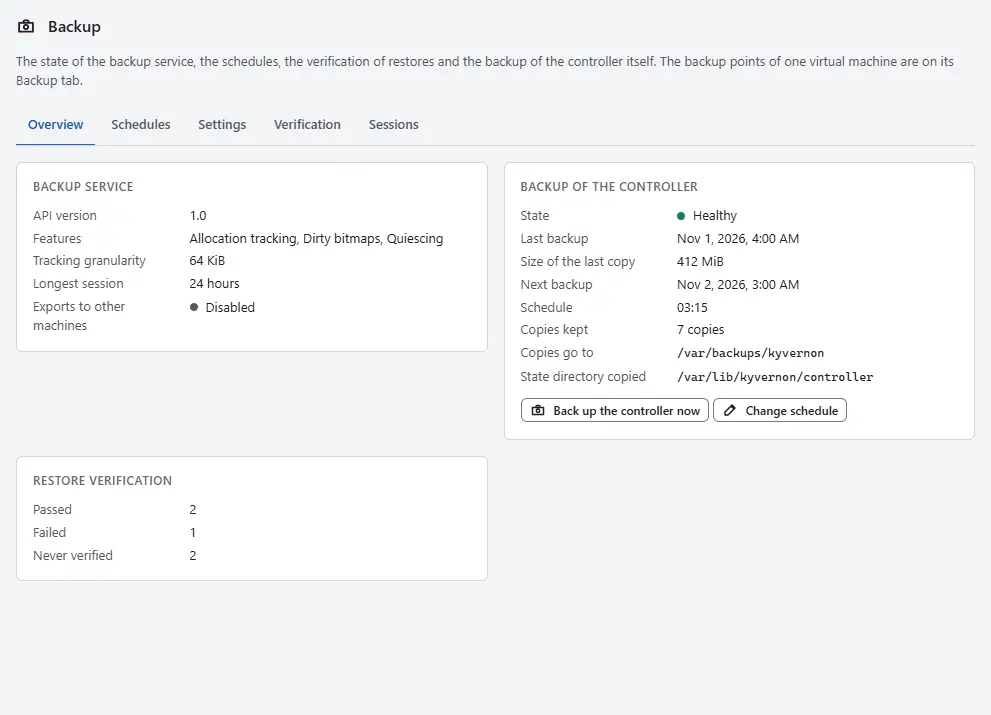
- Select Back up the controller now. The task is in Tasks, and the card shows the new time and size when it ends.
- When the last copy failed, the card shows the error. Fix the cause, for example a full disk at the target, and select Back up the controller now again.
- To change when copies are made, select Change schedule. Switch Take backups of the controller on or off, enter the folder under Copies go to, the Schedule as a time of day in UTC such as 03:15 or an interval such as 6h, and the number of copies under Archives kept, then select Save schedule. The oldest copy is removed when a new one is made.
- Move the copies off the machine regularly. A copy on the same machine does not protect against the loss of that machine.

Changing the schedule needs the privilege Global.Settings. A controller that cannot change it from the console says so in the dialog; the operator then sets the schedule, the target and the number of copies kept in the controller configuration, see Configuration.
Result
The card Backup of the controller shows Healthy, the time of the copy and its size. Changes made after the copy are not in it.
What the copy holds
| Path under the state directory | Content |
|---|---|
inventory.redb | The inventory, users, permissions, tasks, events and audit records, the local groups and the password and lockout policy |
metrics.redb | Performance history and the usage ledger |
keys/ | The identity key (seals of two-step verification secrets and the integrity of API tokens) and the signing key of the vSphere token service |
tls/ | The bootstrap certificate and key that hosts and clients pin |
licence/ | Installed licence files |
identity/ | Files of an earlier version only. Local groups and the password and lockout policy are now in inventory.redb. |
backup/ | Backup sessions and their change ids |
content/, customization/ | Content libraries and customization profiles |
Without the identity key, two-step verification secrets and API tokens cannot be used any more. Keep the copy where only administrators can read it. The copy needs as much free space as the directory, and an upgrade that moves the history to disk needs room for a second copy of the store (Upgrade).
Archives taken by the controller
The controller writes an archive of its own state, on a schedule or on request, without stopping. The leader controller runs it for its own state. The console starts an archive and sets its schedule as described above.
What an archive holds
An archive is a plain tar file named controller-<UTC time>.tar, for example controller-20261114T023000Z.tar. The file has mode 0600 and the folder 0700. It contains:
controller-backup.json, a description with a SHA-256 for each file.controller/inventory.redb, a consistent copy of the store, made from one read transaction while the controller runs.controller/metrics.redb, a consistent copy of the metrics and the usage ledger.- Every other file of the state directory.
config/controller.tomlandconfig/join-token, when the controller knows them.
The controller writes the archive as a .partial file, reads it back and checks every file against its SHA-256 before it keeps it. Then it removes the oldest archives beyond the retention.
Settings
The target, the schedule and the number of copies are these keys of the [backup] section of controller.toml:
| Key | Default | Meaning |
|---|---|---|
controller_target | folder controller-backups next to data_dir, for example /var/lib/kyvernon/controller-backups | Folder for the archives. |
controller_schedule | not set | Time of day in UTC (02:30) or an interval (12h). Not set: only on request. |
controller_retention | 7 | Archives kept. |
The default target is on the same machine as the state. Point controller_target at storage elsewhere, or move the archives off the machine.
Restore
The console is not available while the controller is stopped, so a restore is done on the machine; the steps are in Automation. Restore to the same version of Kyvernon as the copy was made with, or to a newer one. An older version cannot open a store that a newer version has changed; see Upgrade.
When the controller runs again, open the console and check the hosts on the tab Hosts of each cluster. A host that does not connect is described in Troubleshooting.
Automation
With the CLI
Read the controller backups and start one now. controller-backups shows the state and the archives. controller-backup starts a run now; --wait waits for the task to end:
kyvernon system controller-backups
kyvernon system controller-backup --wait
Change the folder, the schedule and the number of archives kept. The change is kept in the replicated store over the [backup] keys and every controller applies it; --disabled keeps the schedule without taking archives on it:
kyvernon system set-controller-backup --target /var/lib/kyvernon/controller-backups \
  --schedule 02:30 --retention 7
To restore from an archive, stop the controller, unpack the state, copy the configuration and start the controller:
sudo systemctl stop kyvernon-controller.service
sudo tar --numeric-owner -C /var/lib/kyvernon -xpf controller-<time>.tar controller
mkdir -p /tmp/kyv
sudo tar -C /tmp/kyv -xpf controller-<time>.tar config
sudo cp /tmp/kyv/config/* /etc/kyvernon/
sudo systemctl start kyvernon-controller.service
kyvernon system ready
Move the archives off the machine. The remaining steps of the restore by hand below apply to a machine that is installed new.
Copy by hand
A copy by hand needs a short pause of the controller: while it is stopped, no task runs and the console and the APIs do not answer. Stopping it does not stop virtual machines. Stop the controller so that the store is copied in a consistent state, copy the directory and the configuration, and start it again:
sudo systemctl stop kyvernon-controller.service
sudo tar --numeric-owner -C /var/lib/kyvernon -cpf controller-state.tar controller
sudo tar --numeric-owner -C /etc/kyvernon -cpf controller-config.tar controller.toml join-token
sudo systemctl start kyvernon-controller.service
kyvernon system ready
Move both archives off the machine. Do not edit them.
To restore, install the controller package on the machine (Install from an offline depot) and do not start the service. Unpack the configuration and the state:
sudo tar -C /etc/kyvernon -xpf controller-config.tar
sudo mkdir -p /var/lib/kyvernon
sudo tar --numeric-owner -C /var/lib/kyvernon -xpf controller-state.tar
Check the configuration and start the service:
sudo kyvernon-controller --config /etc/kyvernon/controller.toml check-config
sudo systemctl start kyvernon-controller.service
kyvernon system ready
A machine with another name or address needs its names in the san setting of the [tls] section of controller.toml, and the agents need the new address in the endpoint setting of agent.toml.
With the API
GET /v1/backup/controller needs System.Read. It shows:
| Field | Meaning |
|---|---|
enabled | A schedule is set. |
target, schedule, retention | The settings in use. |
lastRunAt, lastResult, lastSizeBytes, lastError | The last run. |
nextRunAt | The next scheduled run. |
stateDirectory | The directory that is archived. |
running | A run is in progress. |
archives | name and sizeBytes of each archive, newest first. |
PUT /v1/backup/controller needs Global.Settings and takes enabled, target (an absolute folder the controller can create), schedule (needed when enabled) and retention (1 to 365). It answers the state as GET does.
POST /v1/backup/controller/run needs Global.Settings. It starts the task ServiceInstance.backupControllerState, a copy now.
Related
- Configuration for the settings of the store.
- Upgrade, which starts with a copy of the controller.
- Uninstall, which removes the state directory.
Version 0.1. Last changed: 2026-11-14