API tokens
Create an API token with a lifetime for automation, copy its secret once, and revoke tokens that are lost or no longer needed.
An API token is a long-lived credential for automation that cannot answer a verification code: scripts, Terraform, PowerCLI, govc and backup software. A token belongs to a user, has the privileges of that user and ends at a date. Everyone manages their own tokens; creating tokens for another user needs Kyvernon.Identity.ManageUsers.
Create a dedicated user for automation, mark it as a service account and give it only the role it needs, as described in Users and groups and Roles and permissions. A user may hold at most 16 tokens.
In the console
Open the User menu at the top right and select My API tokens. The same screen is API tokens in the Administration area.
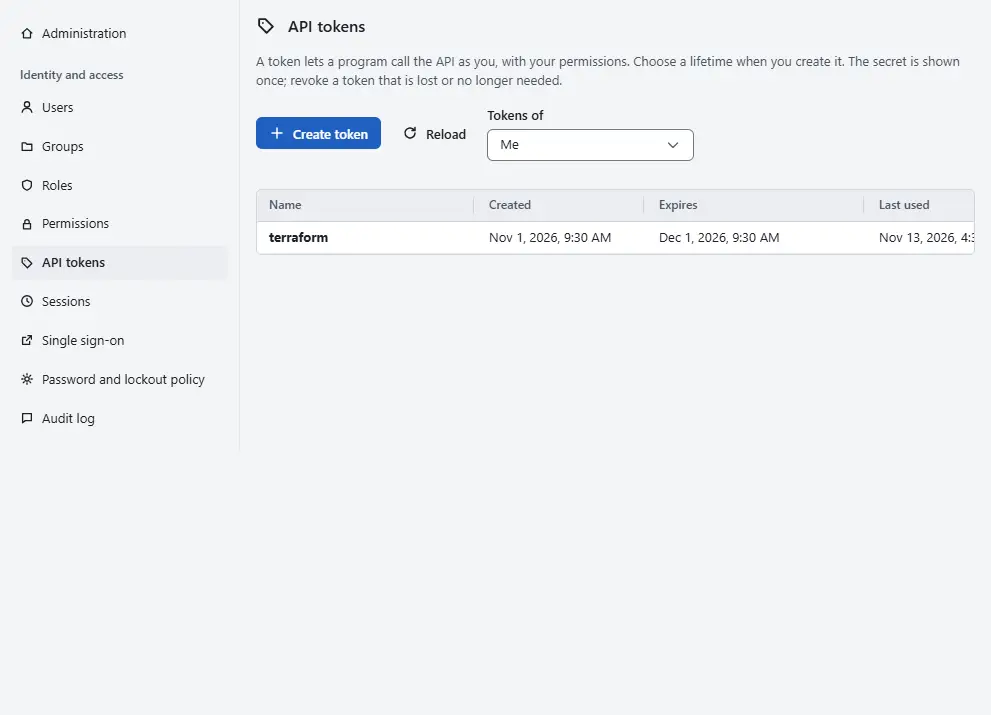
- An administrator who creates a token for another user chooses that user under Tokens of. The choice Me is the signed-in user. API tokens in the menu of a row on the Users screen opens the screen for that user.
- Select Create token.
- Enter a Name that says what the token is for, for example the name of the script.
Choose the Lifetime: 1 day, 7 days, 30 days, 90 days, 1 year or No expiry. Choose the shortest time that suits the job. A token without expiry works until you revoke it, so use that choice only when you cannot rotate the token.
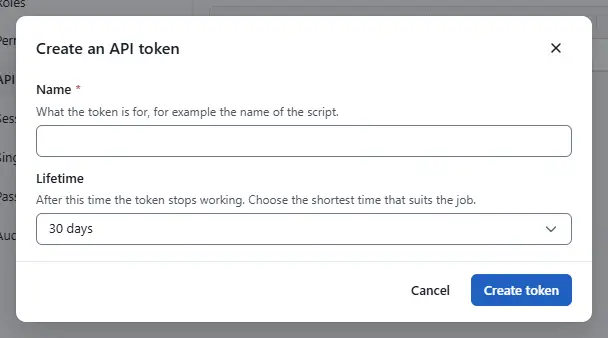
- Select Create token.
The dialog Token ... created shows the Token secret. Select Copy to clipboard and store it in a secret manager or in a file that only the automation can read. The secret is shown once and cannot be read again.
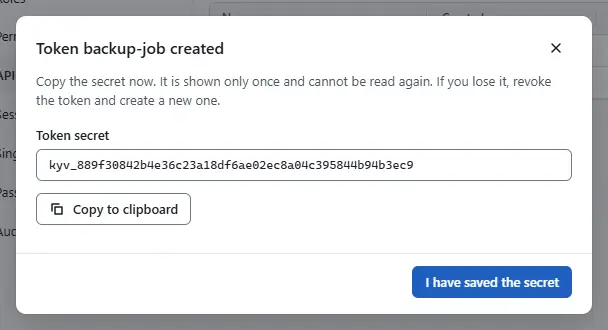
- Select I have saved the secret.


The table lists each token with Created, Expires and Last used, never the secret. To withdraw a token, select Revoke in its row and confirm. Programs that use it stop working at once, and a revoked token cannot be restored. If a secret is lost, revoke the token and create a new one.
Result
The token is in the list and the automation can use its secret as the bearer token of the API, as the token file of the CLI, or in the password field of a vSphere sign-in together with the user name. Kyvernon stores only a keyed hash of each token.
Automation
With the CLI
--ttl is the lifetime in seconds. The secret has the form kyvt_<id>_<secret> and is printed once. The CLI reads a token from a file with --token-file:
kyvernon auth api-tokens create backup-job --ttl 7776000
kyvernon users api-tokens portal create portal-prod --ttl 31536000
kyvernon --token-file /etc/kyvernon/backup.token tasks list
The first command creates a token for the signed-in user and the second one for the user portal. kyvernon auth api-tokens list and kyvernon auth api-tokens delete <token-id> list and revoke your own tokens.
With the API
POST /v1/auth/api-tokens creates a token for yourself with name and an optional ttlSeconds, and the answer has the field token. GET lists your tokens and DELETE /v1/auth/api-tokens/{id} revokes one. For another user the calls are POST, GET and DELETE on /v1/identity/users/{username}/api-tokens.
Lifetime and limits
The longest lifetime is set by the administrator in the controller configuration as api_token_max_ttl, 365 days by default and between one hour and five years. A longer request fails with error.api_token.ttl, an invalid name with error.api_token.name, and a seventeenth token with error.api_token.limit. The name has 1 to 64 characters.
Keep the identity key with the backup of the store: without it the tokens stop working.
Related
- Portal integration uses a token for a self-service portal.
- Sign-in security lists the settings of the identity policy.
Version 0.1. Last changed: 2026-11-14