Sessions and audit
See who is signed in and end sessions, read and filter the audit log, export it, and learn how long records are kept.
A session is the period in which a signed-in user or a token holder may call Kyvernon. The audit log records who changed what and which sign-ins failed. The session list needs Sessions.TerminateSession or Kyvernon.Identity.ManageUsers, and the audit log needs Global.Diagnostics; a screen you may not use is not offered in the Administration area.
In the console
End a session
Open the User menu at the top right, select Administration, and in the list on the left select Sessions.
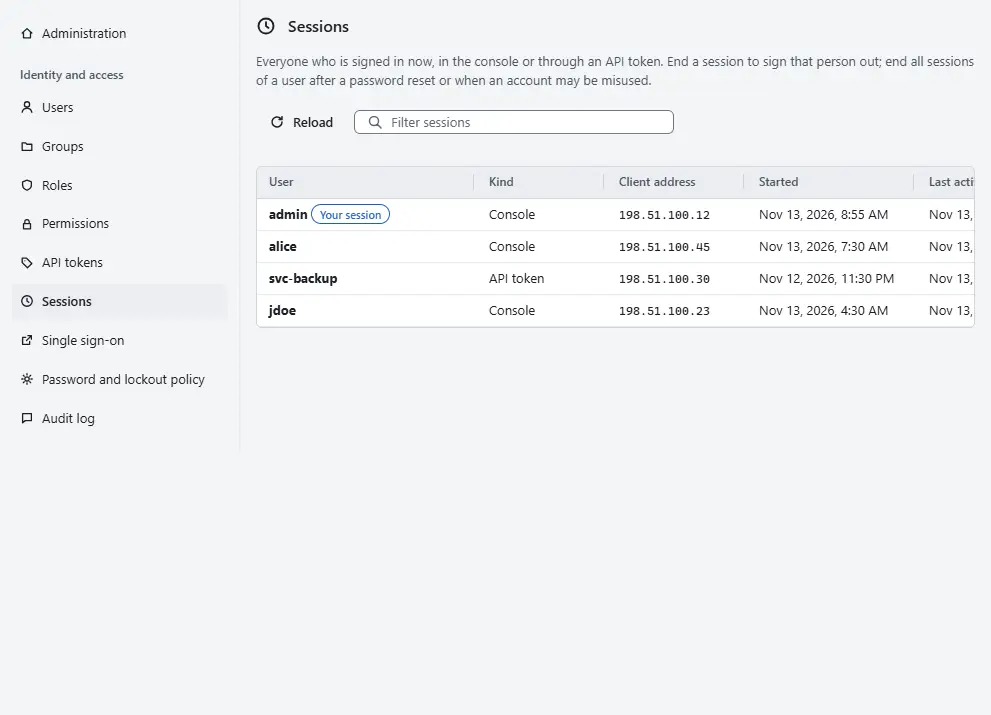
The table lists everyone who is signed in, in the console or through an API token: User, Kind, Client address, Started, Last active and Expires. The session you are using is marked Your session, and a break-glass session carries the badge Break glass. Filter sessions narrows the list by user or address.
- Select End session in a row to sign that session out, or End all of the user to end every session of the user. Confirm the dialog.

End all sessions of a user after a password reset or when an account may be misused. Ending the session you are using signs you out of the console. A disabled user, a user who becomes a service account and a changed password also end sessions.
Every user ends their own session with Sign out. After the idle timeout, the dialog Sign in to continue keeps the work of the page and asks for the sign-in again.
Read the audit log
In the list on the left, select Audit log.
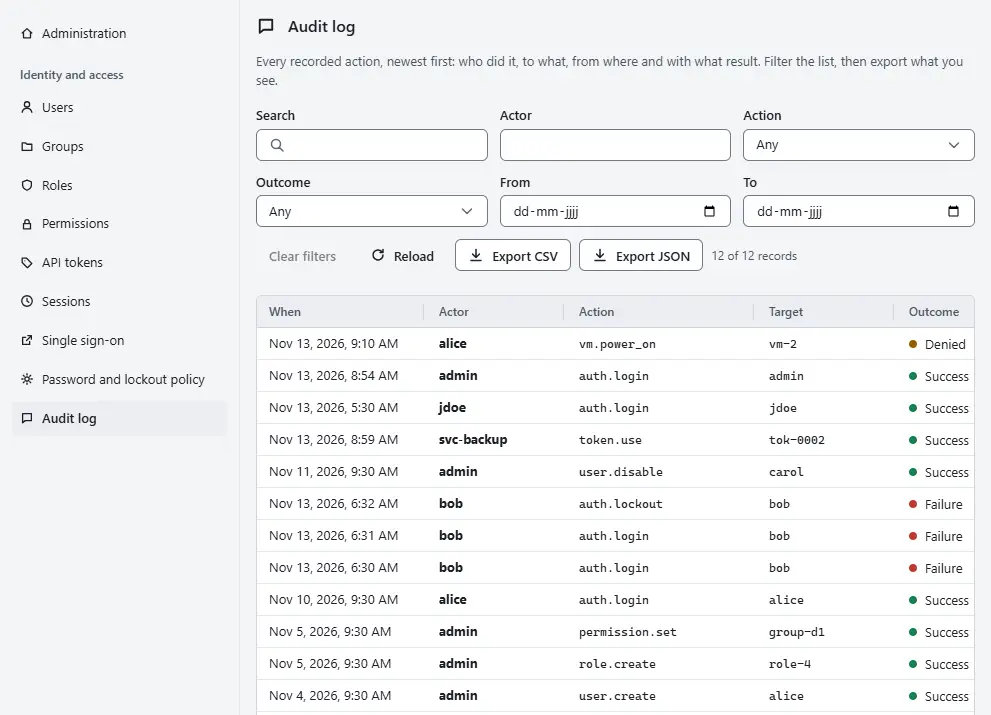
The list shows every recorded action, newest first, with When, Actor, Action, Target, Outcome and From.
- Narrow the list with the filters Search, Actor, Action, Outcome (Success, Denied or Failure), From and To. Clear filters resets them, and a line above the table says how many of the records match.
- Select Details in a row for the Reference, the record number and, for a change, the hashes of the state before and after. A record never holds a password or a secret.
- Select Export CSV or Export JSON to save the records you see, after the filters, as a file.

The actions of this area are named identity.<object>.<verb>, for example identity.user.create, identity.role.update, identity.permission.set, identity.api_token.create, identity.sessions.revoke, identity.login.oidc and identity.mfa.reset. The console reads up to the newest 10,000 records and filters what it has read; for older records use the export described below. Records cannot be changed or deleted through the API.
Result
An ended session is signed out at its next request. The audit log shows the action identity.sessions.revoke with your name as the actor.
Automation
With the CLI
kyvernon sessions list
kyvernon sessions revoke <session-id>
kyvernon users revoke-sessions j.smith
kyvernon audit list --limit 100
audit list shows the oldest records first; --after <next> continues with the cursor of the previous page.
With the API
GET /v1/identity/sessions lists sessions and needs Sessions.ValidateSession. DELETE /v1/identity/sessions/{id} ends one session, and DELETE /v1/identity/users/{username}/sessions ends the sessions of a user; both need Sessions.TerminateSession. GET /v1/audit reads the log with limit, at most 1000, and after.
Export to a log collector
The program kyvernon-audit-export reads the audit log through the API and sends each record as a CEF line over syslog, with TLS or with UDP. It can also write an append-only file in which every record is chained by a hash, and check that file later:
kyvernon-audit-export keygen /etc/kyvernon-audit-export/chain.key
kyvernon-audit-export run --config /etc/kyvernon-audit-export/export.toml
kyvernon-audit-export verify /var/lib/kyvernon-audit-export/audit.chain \
  --key-file /etc/kyvernon-audit-export/chain.key
Use a dedicated user with the privilege Global.Diagnostics and an API token. The configuration of the exporter names the controller and the sinks.
Retention
The controller deletes audit records after 400 days by default; the administrator changes this with audit_age in the section [retention] of the controller configuration, and 0s keeps records without limit. Above 2 GiB the controller logs a warning and records the event AuditHistoryLargeEvent, which an alarm can react to. Nothing is deleted because of the size. Keep audit_age longer than the time the exporter can fall behind.
Related
Version 0.1. Last changed: 2026-11-14