Single sign-on
Connect an OpenID Connect identity provider in the console, give its groups roles and sign in with an organisation account.
Kyvernon signs users in through an identity provider that speaks OpenID Connect. It uses the authorization code flow with PKCE and reads the groups of the user from a claim of the identity token. The provider performs the authentication, including its own second factor. You need the privilege Global.Settings on the root.
Before you start, register Kyvernon as a client at the provider and note the issuer address, the client id and the client secret. Make the provider send the groups of the user in a claim, groups by default, for example through the scope groups. Keep the local administrator and the break-glass account: they are the way in when the provider is down.
In the console
Open the User menu at the top right, select Administration, and in the list on the left select Single sign-on. The heading Identity provider shows the state, Configured or Not configured.
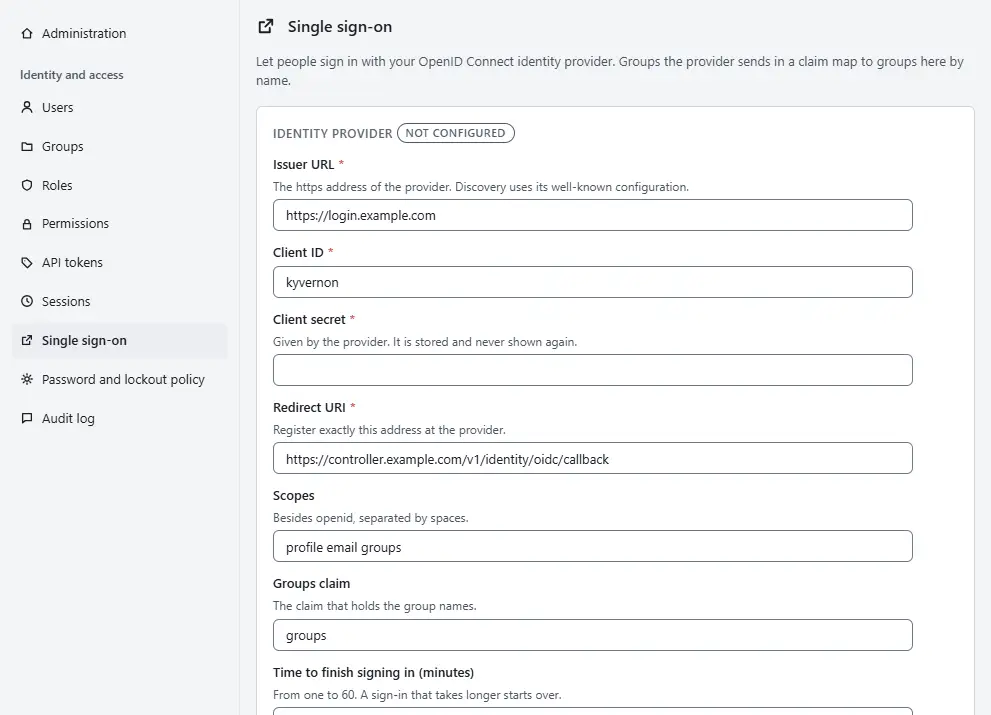
- Enter the Issuer URL: the https address of the provider. Kyvernon reads the discovery document at
<issuer>/.well-known/openid-configuration. - Enter the Client ID and the Client secret that the provider gave you. The secret is stored and never shown again. When one is stored, leave the field empty to keep it, or type a new one to replace it.
- Check the Redirect URI. The console fills in the address under which you reached it, and you register exactly this address at the provider.
- Under Scopes, list the scopes besides
openid, separated by spaces, for exampleprofile email groups. Under Groups claim, name the claim that holds the group names. Under Time to finish signing in (minutes), enter a whole number from 1 to 60. - Select Save.

The sign-in page now offers the button Sign in with your organisation, or Sign in with ... with the host name of the issuer, above the line or use a local account and the local sign-in form. A user selects the button, signs in at the provider and returns to the console.
A federated user has no role at first. Give a role to the group that the provider sends: on the Permissions screen, add a permission for the Group whose name is the value of the groups claim, as described in Roles and permissions.
To stop sign-in through the provider, select Remove provider and confirm. The accounts stay and local sign-in keeps working, so make sure at least one local administrator can sign in first.
Note
The screen needs a control plane that offers the setting. On one that does not, it shows Not available on this control plane yet; the Automation section describes the way that works today.
Result
People of the provider sign in with the organisation account. A federated account is created at the first sign-in, with the preferred user name of the provider in lower case as its user name, or oidc:<subject> when the provider sends none. Kyvernon updates the groups, the email address and the display name at every sign-in, so a change of group at the provider applies at the next sign-in, and a user that you disable stays refused. A federated user whose name equals a local user is refused, so that a local account cannot be taken over. The audit log records each sign-in as identity.login.oidc with the issuer; see Sessions and audit.
The CLI signs in with a password or a token, so a federated user who needs the CLI asks an administrator for an API token.
Automation
With the CLI
The provider is set natively, without a change of the configuration file. Show the current setting, set the provider and remove it:
kyvernon users oidc
kyvernon users set-oidc --issuer https://idp.example.com --client-id kyvernon \
  --client-secret-file /root/oidc-secret \
  --redirect-uri https://controller.example.com/v1/identity/oidc/callback \
  --scope profile --scope email --scope groups --groups-claim groups --login-ttl 600
kyvernon users remove-oidc
--client-secret-file reads the secret from a file, or from standard input with -. Without it the stored secret is kept; it is required the first time, unless the [oidc] section of controller.toml already has one. Before it stores anything, the controller runs OpenID discovery at <issuer>/.well-known/openid-configuration. A provider that does not answer is refused with error.identity.oidc_unreachable, and the stored provider stays.
The setting overrides the [oidc] section of controller.toml. remove-oidc removes the provider, and also switches off a provider that comes from the [oidc] section. Local sign-in stays.
Alternatively, set the provider in the section [oidc] of the controller configuration: issuer, client id, a file that holds the client secret, redirect address, scopes and groups claim. Restart the controller after the change, then check that the console offers the provider:
kyvernon auth configThe answer shows oidc with enabled set to true and the label of the button. Give a role to the group that the provider sends:
kyvernon roles list
kyvernon permissions set group-d1 vm-admins --group --role <role-id>
group-d1 is the root folder and vm-admins is the value of the groups claim.
With the API
GET /v1/auth/config tells a client, before anyone has signed in, whether the provider is configured. The browser flow uses GET /v1/identity/oidc/start, which returns the address of the provider and sets a cookie that binds the login to the browser, and GET /v1/identity/oidc/callback, which the provider calls. Programmatic clients do not use these routes.
The provider itself is managed with GET, PUT and DELETE /v1/identity/oidc/config. All three need Global.Settings, and changes are audited. The view has these fields:
| Field | Meaning |
|---|---|
configured | Whether a provider is set. |
issuer, clientId, redirectUri, scopes, groupsClaim, loginTtlSeconds | The settings in use. |
clientSecretSet | Whether a secret is stored. The secret is never returned. |
source | console, configuration or none. |
PUT takes these fields:
| Field | Meaning |
|---|---|
issuer | The https address of the provider. |
clientId | The client id. |
clientSecret | Write only. Blank or absent keeps the stored secret. Required the first time, unless the [oidc] section of controller.toml already has one. |
redirectUri | Normally https://<controller>/v1/identity/oidc/callback. |
scopes | Scopes beyond openid. |
groupsClaim | The claim with the group names. Default groups. |
loginTtlSeconds | 60 to 3600. |
The secret is sealed with the identity key of the controller in the replicated store. DELETE removes the provider.
Related
- Roles and permissions gives the groups their access.
- Identity troubleshooting lists the messages of a failed sign-in.
Version 0.1. Last changed: 2026-11-14