Webhooks
Subscribe a receiver to events in the console, test it, read the delivery log, and handle signatures, retries and dead letters.
A webhook subscription makes Kyvernon send an HTTP request to a receiver for every event that matches. The body is a CloudEvents 1.0 document in JSON, signed with a shared secret. Alarms can send their status changes to the subscriptions that carry a label, and the daily usage summary is delivered in the same way. Managing webhooks needs Kyvernon.Webhook.Manage.
The receiver must be reachable from the controller. Private, loopback and link-local addresses are refused unless an administrator allows them; see Restricted targets. Choose a secret of at least 16 characters: Kyvernon uses it to sign every delivery, and the receiver uses it to verify them.
In the console
Open the home page (Home) and select Webhooks under Shortcuts.
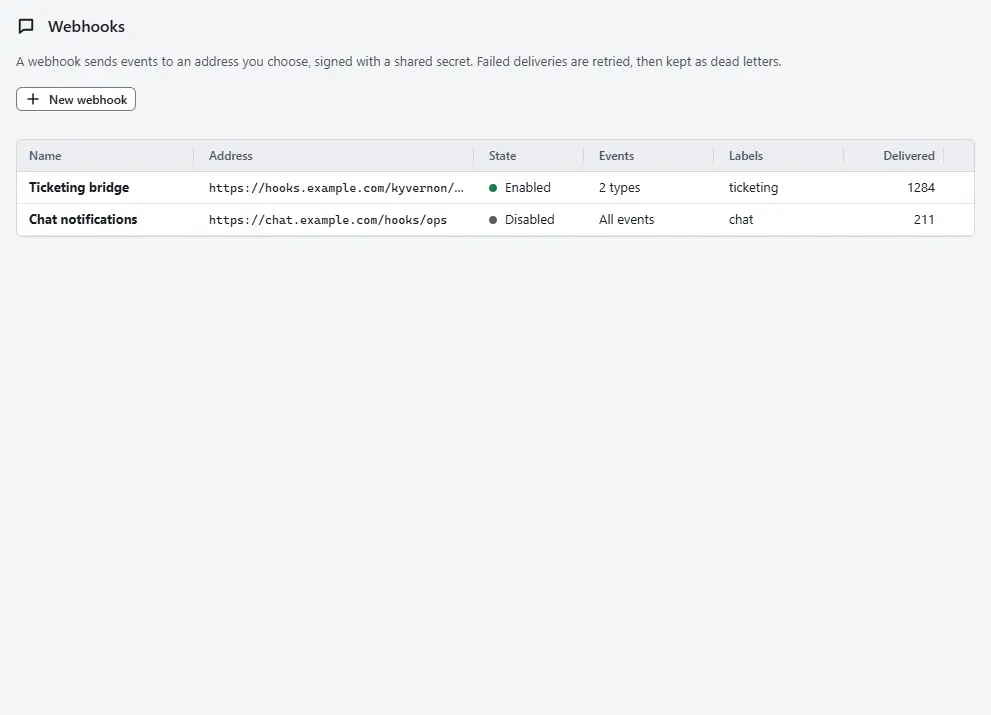
The table shows each subscription with its Address, State, the Events it receives, its Labels and the counters Delivered, Failed and Dead letters.
- Select New webhook. Enter the Name and the Address of the receiver. An https address is recommended.
- Enter the Shared secret, or select Generate to make one. It has at least 16 characters and is not shown again, so store it where the receiver can read it.
- Under Event types, list the event types to send, separated by commas. Empty sends every event. Under Labels, give the subscription labels, so that an alarm can pick it; see Alarms.
Set the Attempts per event, from 1 to 20 (5 is the default). After the last attempt the event becomes a dead letter. Fill in Tenant only for a self-service integration: the subscription then receives only the events of that tenant; see Portal integration.
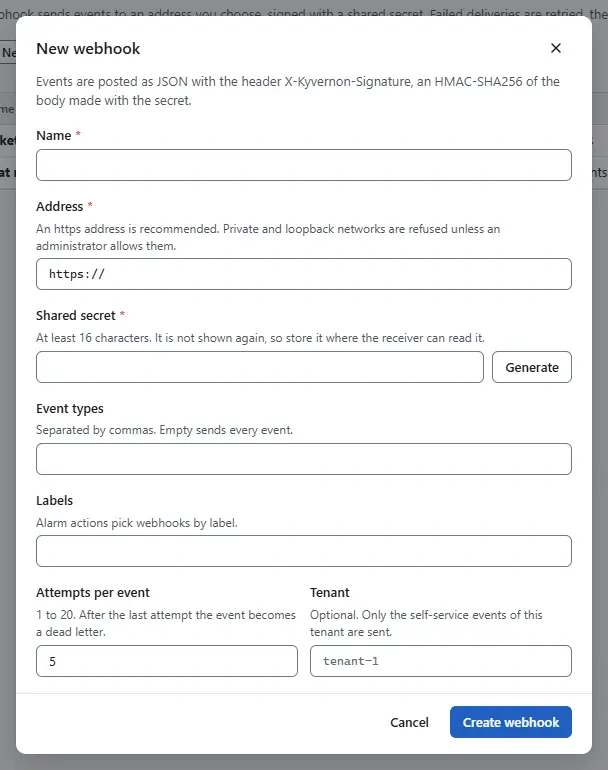
- Select Create webhook.
- In the row of the new subscription, select Send test. A test event goes to the receiver, and a message says whether it answered with a status in the 2xx range.
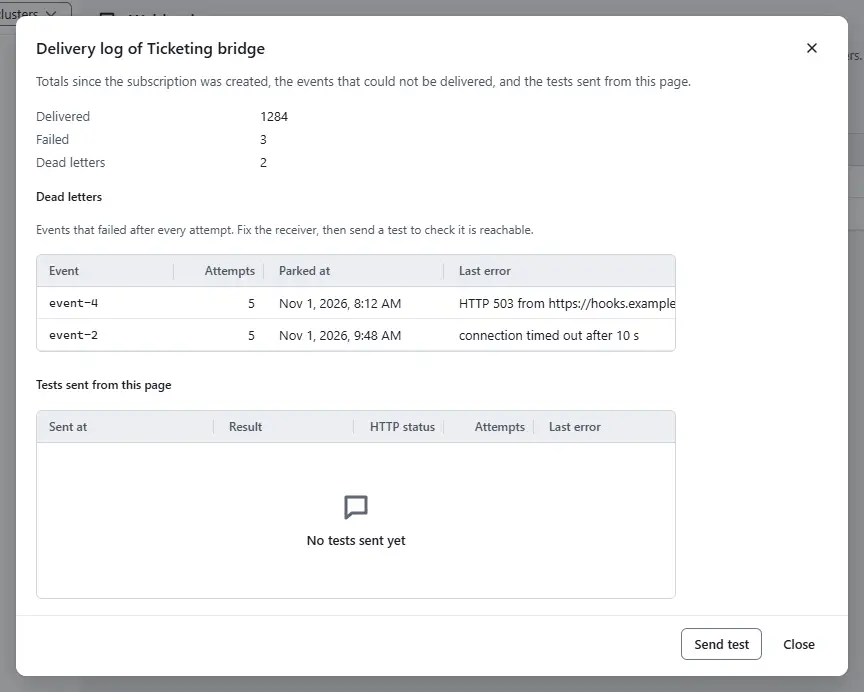
Select Delivery log to read the delivery log: the totals since the subscription was created, the dead letters with their attempts and last error, and the tests sent from this page. Send test is also in the dialog.


Edit changes a subscription; leave the secret empty to keep the stored one, and use Webhook is enabled to pause deliveries. Delete removes it, and its dead letters are lost; alarms that send to its labels no longer reach it.
Result
The subscription is in the list, the test shows Delivered, and the receiver gets every matching event from now on.
Automation
With the CLI
The secret comes from the environment variable KYVERNON_WEBHOOK_SECRET or from --secret:
export KYVERNON_WEBHOOK_SECRET="<secret of at least 16 characters>"
kyvernon webhooks create ops-receiver --url https://hooks.example.com/kyvernon \
  --event VmPoweredOffEvent --event HostDisconnectedEvent --label ops-pager --max-attempts 5
kyvernon webhooks test <id>
kyvernon webhooks update <id> --body-file webhook.json
kyvernon webhooks dead-letters <id>
kyvernon webhooks deliveries <id>
--event and --label can be repeated. webhooks deliveries <id> shows the last 50 deliveries of a subscription. webhooks list shows the counters of every subscription, and webhooks delete <id> removes one. To verify a delivery in a shell, compute the signature over the timestamp, a dot and the body:
printf '%s.%s' "$TIMESTAMP" "$BODY" | openssl dgst -sha256 -hmac "$KYVERNON_WEBHOOK_SECRET"With the API
POST /v1/webhooks creates a subscription with name, url, secret, eventTypes, labels, maxAttempts and tenant. GET /v1/webhooks lists them, PUT /v1/webhooks/{id} changes one, POST /v1/webhooks/{id}/test sends a test, GET /v1/webhooks/{id}/dead-letters reads the dead letters and DELETE /v1/webhooks/{id} removes one. The gRPC service WebhookService offers the same operations.
GET /v1/webhooks/{id}/deliveries needs Kyvernon.Webhook.Manage. It returns the last 50 deliveries of the subscription, newest first. They are kept in the replicated store with the subscription. Test deliveries are logged too. Each delivery has these fields:
| Field | Meaning |
|---|---|
eventId | The id of the event. |
eventType | The CloudEvents type, for example kyvernon.event.VmPoweredOnEvent or kyvernon.test. |
startedAt | When the first attempt started. |
durationMs | Time from the first attempt to the outcome, retry waits included. |
attempts | Number of attempts. |
status | HTTP status of the last attempt. 0 means no response. |
delivered | Whether the delivery succeeded. |
error | The error of the last attempt, if any. |
What a delivery looks like
Each delivery is a POST with the content type application/cloudevents+json and these headers:
| Header | Content |
|---|---|
X-Kyvernon-Signature | sha256= followed by the hexadecimal HMAC-SHA256 of the text <timestamp>.<body> under your secret |
X-Kyvernon-Timestamp | The Unix time in seconds that was signed |
X-Kyvernon-Event-Id | The id of the event, equal to the CloudEvents id |
The CloudEvents type is kyvernon.event.<event type>, for example kyvernon.event.VmPoweredOffEvent, and data holds the event as the API shows it. The daily usage summary has the type kyvernon.usage.daily_summary; subscribe to it with the event type UsageDailySummary.
Verify a delivery before you trust it. Compute the HMAC over the timestamp, a dot and the raw body, compare it with the header in constant time, and reject a timestamp that is too old. A repeated delivery carries the same event id, so a receiver can drop duplicates.
Retries and dead letters
A delivery succeeds when the receiver answers with a status in the 2xx range within 10 seconds. Otherwise Kyvernon tries again with a delay that starts at one second and doubles up to 60 seconds, until the number of attempts is reached. Kyvernon follows no redirects. After the last attempt the event is parked in the dead letters of the subscription, with the number of attempts and the last error, in a bounded list. Repair the receiver, send a test to check that it is reachable, and use the event ids to find the events in the event list.
Restricted targets
Kyvernon refuses a target that is a loopback, private, link-local, shared (carrier-grade NAT), multicast or other special-purpose address, so that a subscription cannot reach internal services. The check runs when you create the subscription and again at every delivery, on the addresses that the host name resolves to. The refusal is error.webhook.target_restricted. When the receiver sits in your own network on purpose, an administrator lists that network, for example 198.51.100.0/24, as an allowed network in the section [webhooks] of the controller configuration and restarts the controller. The configuration reference has the key.
Related
Version 0.1. Last changed: 2026-11-14