Tasks
Follow the tasks of operations that take time in the console, cancel one, read its result and find the tasks of one action.
A task is an operation that takes time: powering on a virtual machine, cloning it, adding a host. When you start one in the console, the request answers at once and the work continues in the background. A task is in one of five states: Queued, Running, Completed, Failed or Cancelled. This page shows how to follow a task and how to cancel it.
In the console
- Look at the pane at the bottom of every page. The tab Recent tasks lists the latest tasks, and its counter shows how many are queued or running. The tabs Events and Alarms sit next to it. Select Expand tasks pane to enlarge the pane, Collapse tasks pane to shrink it, or drag its edge to resize it.
- A running task shows a progress bar, and the pane refreshes every two seconds while a task runs. A finished task shows Completed, Failed or Cancelled, and a failed task names the error in its message.
To see more than the pane holds, open the page Tasks: on the home page (Home), select Tasks under Shortcuts.
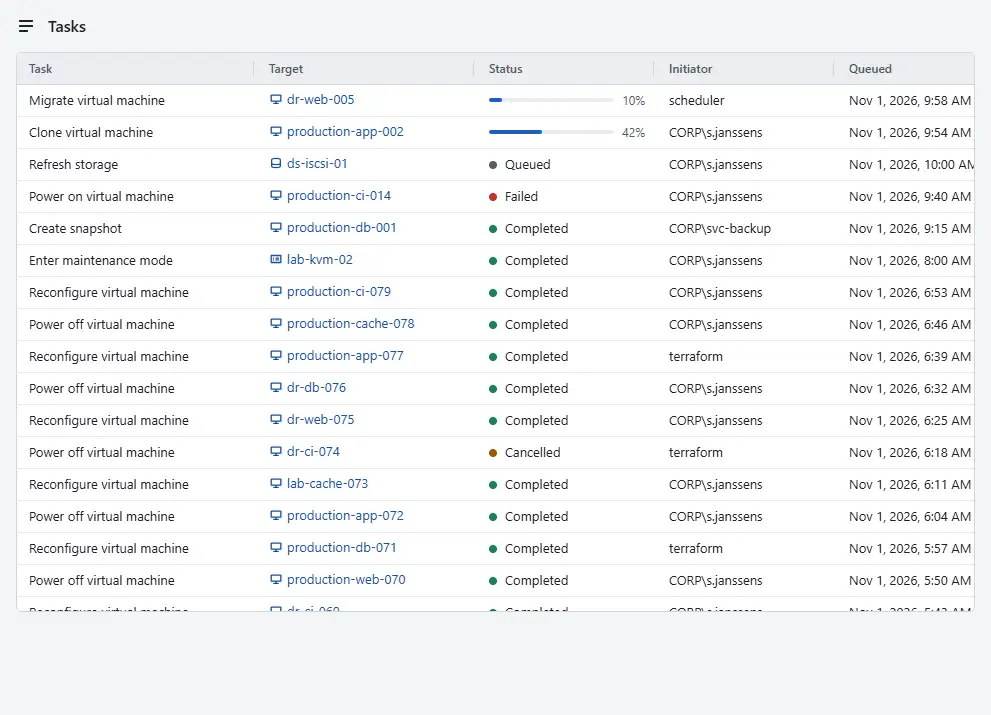
The table has the columns Task, Target, Status, Initiator, Queued and Completed. The target is a link to the object the task works on.
- To stop a task that is queued or running, select Cancel in its row. The dialog Cancel this task? says that the task stops at the next safe point. Select Cancel the task, or Let it run to leave the task alone.

You can cancel your own tasks. Cancelling the tasks of other users needs the privilege Global.CancelTask; without it the button does not appear in their rows. A cancelled operation can leave work half done. Work that already happened is not undone, so check the object afterwards.
Result
A cancelled task shows Cancelled. Events records what the task did before it stopped. When a task shows Completed, the operation is done. A task that ended with Failed names the cause in a message id; see the error codes. A task whose secret parameters lived only in the memory of a controller that restarted ends with error.task.secrets_lost; start the operation again.
The console keeps the tasks of the last 30 days, and at most 100,000 of them. Running tasks are never removed. Above the history size limit that the administrator sets in the controller configuration as history_max_bytes, the oldest tasks and events are removed first.
Automation
With the CLI
kyvernon tasks list --target vm-42 --desc --limit 20
kyvernon tasks list --state running,queued
kyvernon tasks wait task-42 --timeout 300
kyvernon tasks cancel task-42
tasks list shows the oldest tasks first; --desc shows the newest first, and --after takes the cursor next of the previous page. tasks wait holds the request until the task has ended or the timeout, in seconds, has passed; a task that is still running at the timeout is returned as it is, so run the command again to keep waiting. A task shows state, progress from 0 to 100, queuedAt, startedAt, completedAt, the initiator, the target and the result or the error. The chainId is the same for every task and event of one action, so --chain <id> on tasks list and events list collects them.
With the API
GET /v1/tasks lists tasks with target, state, user, chainId, since, order, limit and after. GET /v1/tasks/{id} reads one, GET /v1/tasks/{id}/wait?timeout=<seconds> waits, and POST /v1/tasks/{id}/cancel cancels. The API names the states queued, running, success, error and cancelled. Listing needs System.View on the root, and a task about an object that you may not see is not listed. API conventions describes the task envelope and paging.
Related
Version 0.1. Last changed: 2026-11-14