Events
Read and filter the event list in the console, share a filtered view, add your own events and learn how long events are kept.
An event is a record of something that happened to an object: a virtual machine was powered on, a host disconnected, an address was changed. Kyvernon records events for every change, whichever surface made it. An event has a type such as VmPoweredOnEvent, a severity, the object, the user and the time. You see the events of the objects you may see, which needs System.View.
In the console
For the latest events, open the tab Events in the pane at the bottom of every page. For the full list, open the home page (Home) and select Events under Shortcuts.
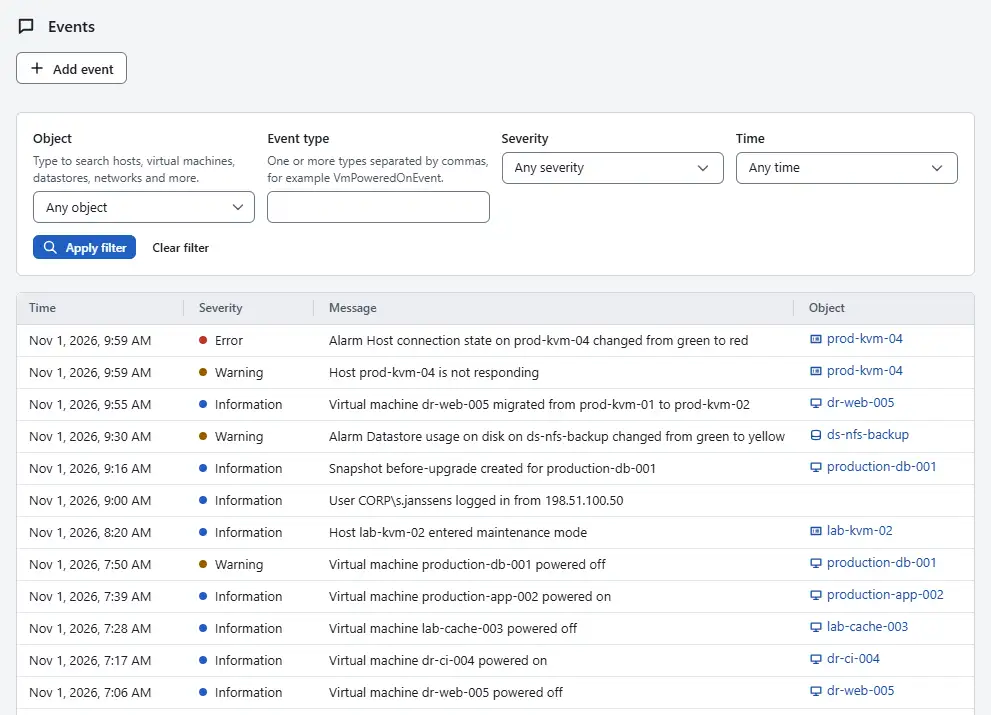
The table has the columns Time, Severity, Message, Object and User. The severities are Information, Warning and Error. The object is a link to the object the event is about.
- In the form Filter events, choose the Object: type to search hosts, virtual machines, datastores, networks and more. For a cluster or folder, Include objects inside it also shows the events of everything inside it.
- Enter an Event type, or several separated by commas, for example
VmPoweredOnEvent. Choose the lowest Severity that interests you, and a Time: Past hour, Past day, Past week or Custom range with From and To. - Select Apply filter. The filter runs on the control plane, so a filtered list holds the newest matching events and not only a part of the unfiltered page. A line next to the buttons gives the number of matching events.
- Select Load older events to read further back, 100 events at a time. Clear filter removes the filter.

The address of the page keeps the filter, so a filtered view survives a reload, and you can share it or bookmark it. To add an event of your own, select Add event, choose the Object, write the Message and select Add event. The event is recorded as a user event on that object with your user name, for notes such as the start of a maintenance window. You need the privilege Global.LogEvent on the object.
:::screen events-add
Result
The list shows the events that match, newest first. The events of an object that has been deleted stay in the list with the name that the object had, for users who hold System.View on the root.
The controller keeps events for 90 days and at most 1,000,000 of them. Above the history size limit that the administrator sets in the controller configuration as history_max_bytes, the oldest events and finished tasks are removed first. Audit records are kept apart and for longer; see Sessions and audit.
Automation
With the CLI
kyvernon events list --desc --limit 50
kyvernon events list --target vm-42 --recursive --event-type VmPoweredOnEvent,VmPoweredOffEvent
kyvernon events log vm-42 "Maintenance window agreed with the owner"
events list shows the oldest events first; --desc shows the newest first, and --after takes the cursor next of the previous page. Further filters are --user, --begin and --end in RFC 3339 form, and --chain <id>, which collects the events and, with kyvernon tasks list --chain, the tasks of one action. events log adds a user event with the type GeneralUserEvent to an object, for example to note a change that happened outside Kyvernon. kyvernon events post --body-file event.json posts a typed event.
With the API
GET /v1/events lists events with target, recursive, eventType, user, chainId, begin, end, minSeverity, order, limit and after. POST /v1/events/user adds a user event with entityId and message, and POST /v1/events posts a typed event; both need Global.LogEvent. The severity is info, warning, error or user. The gRPC service EventService lists events as well.
Related
Version 0.1. Last changed: 2026-11-14