Import a VMDK disk
Import the VMDK disks of a package in the console, the formats that the import converts to qcow2 and what to do with a disk that is refused.
A VMDK disk reaches Kyvernon as a file of an import and is converted to qcow2 while it is stored. A VMDK file on a datastore is not a disk that a virtual machine can use: Kyvernon runs qcow2 and raw images only, and refuses to start a machine whose disk is a VMDK file (storage.image.vmdk_not_runnable). Uploading a VMDK to the Files tab of a datastore therefore does not import it. Plan free space in the state directory of the controller: the upload is written below it, up to twice the capacity of the disk, and the converted image is written next to it while the file converts. The space is released at completion, on cancel, on error and at the next start of the controller.
In the console
- Export the machine from vSphere as an OVA, or as an OVF package with its disk files, and prepare the guest, see Import an OVA or OVF package.
- On the home page, select Import and export, then Import OVA or OVF.
In the step Package, select Choose files and choose the OVF descriptor together with its VMDK files in one selection, or the OVA. The wizard accepts the extensions
.vmdk,.vhd,.qcow2,.img,.rawand.isonext to the descriptor. When the descriptor names a disk that you did not choose, the console names the missing file.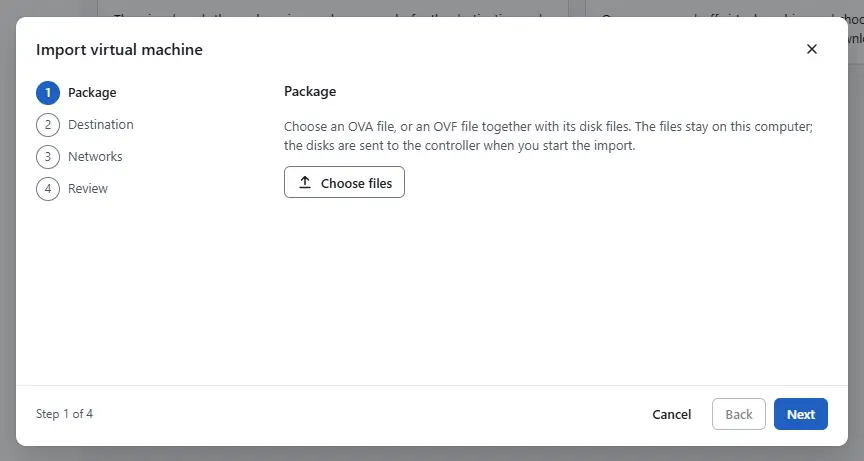
- Continue with the steps Destination, Networks and Review, and select Start import. The controller recognises the format from the content of the file, converts it and attaches the disk to the new machine.
- Keep the page open while the disks are sent. When the controller refuses a disk, the import stops with an error. Read the reason, correct the disk as described below and import again.

Formats the upload accepts
| Format | Result |
|---|---|
| streamOptimized VMDK, the format of the disks in an OVA | Converted, thin |
| monolithic sparse VMDK (one file) | Converted, thin |
| One-file flat or raw image | Converted, thin |
| VMDK descriptor without its data extents | Refused with import.nfc.descriptor_only |
| Disk split into 2 GB extents | Not accepted: the upload is one file. Export the machine again as an OVA |
| Disk with a parent disk (snapshot delta) | Refused with import.vmdk.snapshot_delta: consolidate the snapshots at the source |
| Raw device mapping | Refused with import.vmdk.unsupported_type |
Sparse files with a header version other than 1 to 3 or with a compression other than deflate are refused. A virtual disk can be at most 64 TiB. The result is a qcow2 image without a backing file. Blocks that are all zero are not stored, so the image stays thin.
Result
The disk is a qcow2 image on the datastore chosen in the step Destination, attached to the new virtual machine.
Automation
With the CLI
The disks go to the lease that kyvernon ovf import-vapp returns, see Import an OVA or OVF package:
kyvernon nfc upload <lease-id> disk-0.vmdk /path/to/disk1.vmdk
kyvernon nfc get <lease-id>
kyvernon nfc complete <lease-id>
The name is the one in files of the lease. The conversion runs when you complete the lease. When it fails, the lease shows the state error with the reason in error.
With the API
PUT /v1/nfc-leases/{id}/files/{name} uploads the file as the request body. POST /v1/nfc-leases/{id}/complete converts and attaches the disks.
Related
Version 0.1. Last changed: 2026-11-14